
Bring your own key
Let an organization route its Anthropic and OpenAI traffic through its own provider accounts. Configure the encryption key, switch BYOK on per organization, and watch key health and fallback across the platform.
With bring your own key (BYOK), an organization's owners and admins add their own Anthropic or OpenAI API keys. Requests those keys serve run on the organization's provider account, are metered at the organization's internal price, and are never charged to its wallet. Their own guide is Bring your own key.
A platform administrator's part is small:
- Configure the encryption key once, for the deployment.
- Switch BYOK on for each organization that asks.
- Decide whether that organization's failed keys may fall back to platform capacity, and which providers it may add.
- Watch key health and fallback across organizations.
Keys, model mappings, routing and prices stay with the organization. A platform administrator sees key metadata and health, never a secret.
Before you start
| Requirement | Why |
|---|---|
TOKAMAK_CLAUDE_POOL_TOKEN_ENCRYPTION_KEY is set on tokamak-core | Provider keys are encrypted with the same key as Claude Pool tokens, with a separate binding. The pool itself does not need to be switched on. Without the key, saving a provider key answers 503 byok_encryption_unconfigured |
| The models the organization will use are in the catalog, active and priced | A key can only serve Tokamak catalog models, and its template maps only ids that exist. The list price is the default internal price and the price of fallback |
Auth migration 000031 has run | It adds org.providers.manage and grants it to organization owners and admins |
Rotate the encryption key the way you rotate it for Claude Pool, with the _PREVIOUS variables. Existing keys stay readable while you do, and the maintenance job re-encrypts them under the new key (see Background upkeep); once it has, the previous key can be removed. A server that cannot decrypt a key skips it, logs an error naming the key id, and records decrypt_failed as the key's last failure. It does not disable the key, so one misconfigured replica cannot switch keys off for the whole fleet. See Environment variables.
Keys only ever go to the provider's official API. Each provider template names its HTTPS endpoint, and nobody can change it through the API or the console. TOKAMAK_BYOK_ALLOW_ENDPOINT_OVERRIDE and TOKAMAK_BYOK_ENDPOINT_OVERRIDES exist for local development and tests, and core logs a warning at startup while they are on. Do not set them in production.
Switch BYOK on for an organization
In the admin console, open Organizations, select the organization and choose its BYOK tab. Tenants › BYOK opens the same tab from its overview. You need admin.workspace.manage.
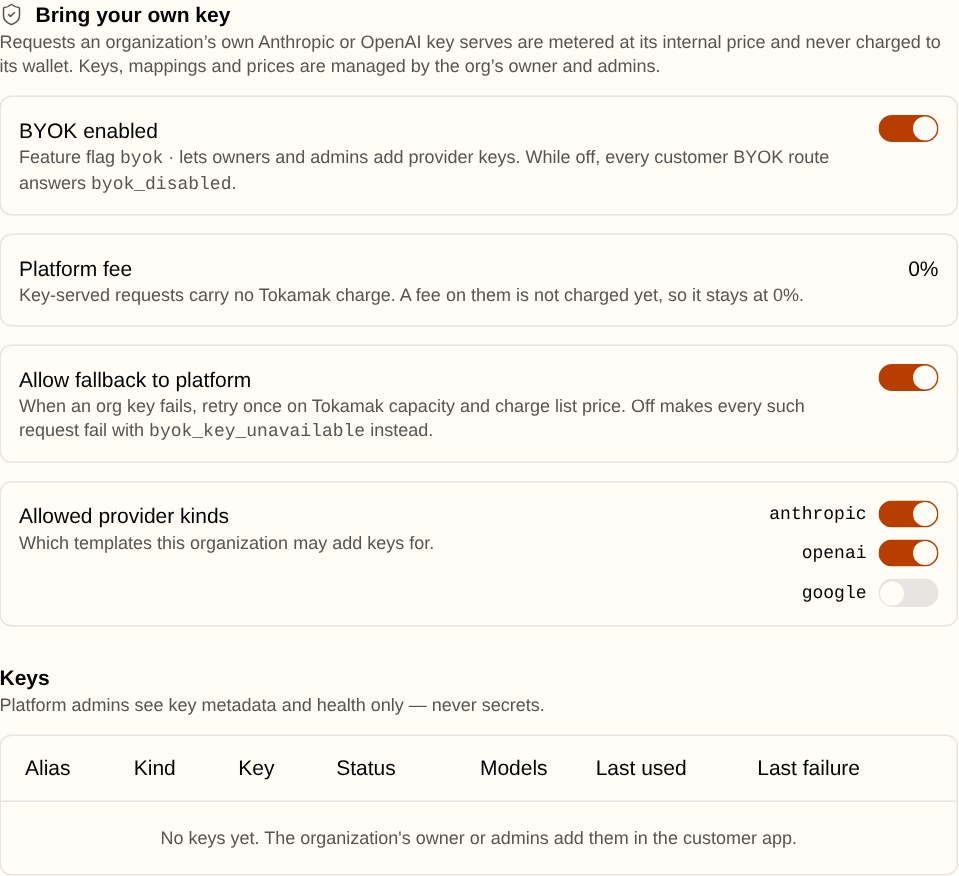
| Setting | Default | What it does |
|---|---|---|
| BYOK enabled | Off | The byok organization feature, also shown under Features. While it is off, the organization has no Providers page, and every provider-key route except delete answers 403 byok_disabled. Keys it already has stop serving but stay stored until they are deleted |
| Platform fee | 0% | Requests the organization's keys serve carry no platform charge. The fee is fixed at 0%: the setting and the organization's Platform fee on your keys billing row exist so a fee can be introduced later, but nothing charges one |
| Allow fallback to platform | On | When one of the organization's keys fails, the request is retried once on platform capacity and charged at list price. Off means no such request runs on platform capacity, whatever the organization chose: a rejected or disabled key answers 503 byok_key_unavailable, and any other provider error is relayed as sent |
| Allowed provider kinds | Anthropic and OpenAI | Which provider templates the organization may add keys for. A key of a kind you switch off stops serving |
The key table lists every stored key, and Delete removes one. It stops serving at once and its secret is erased; its usage history stays. Delete works whether or not BYOK is on, so switching the feature off never leaves a secret you cannot remove.
Every change is recorded in the admin audit log: byok.settings.update and byok.credential.delete.
Watch every organization
Tenants › BYOK lists every organization with its BYOK state, its number of keys, their health, the last seven days of key-served requests and their internal value, and what fallback cost. Select a row to open that organization's BYOK tab.
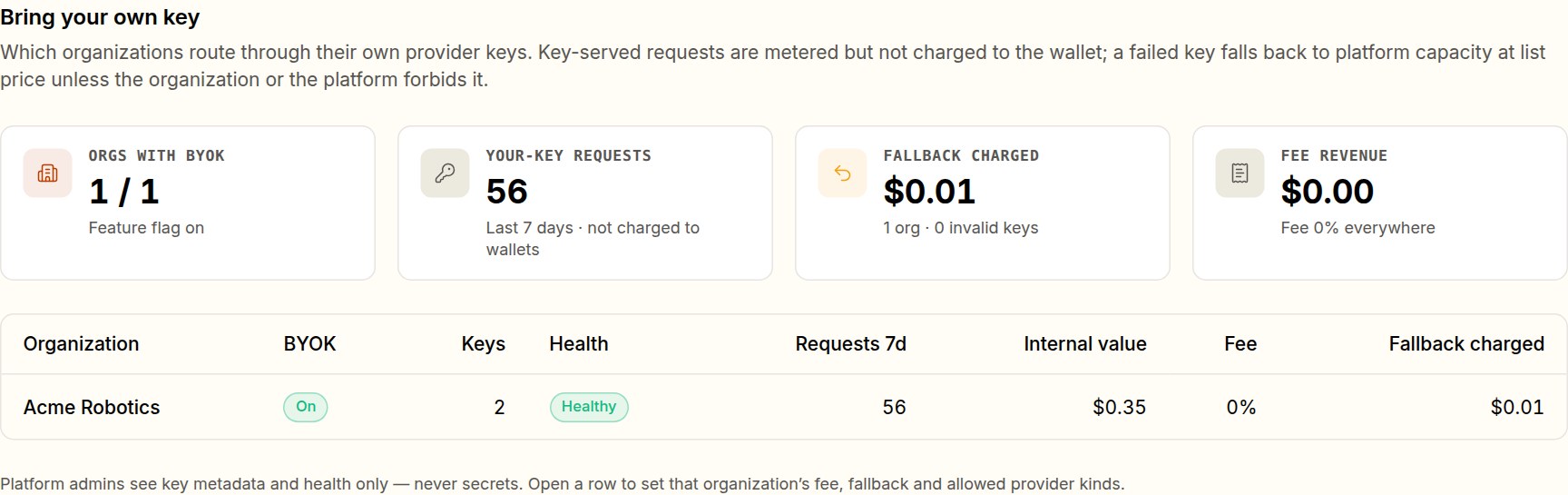
- Healthy means every key is active. Invalid counts keys that were disabled automatically after a
401; the organization must rotate them. - Fallback charged is the list-price cost of requests that fell back from a failed key. A steady fallback cost usually means a key has been failing for a while.
- Your-key requests are metered but not charged to any wallet.
What the platform keeps
A key-served request goes through the same request path as any other, except for the upstream credential and the charge:
- Admission. Usage limits apply (access policies only filter
tokamak/autocandidates; a request that names a model is not checked against them). The usage-limit reservation is taken at the internal price. No credit is checked or held, so an organization with an empty wallet can use its own key. - The usage row.
credential_sourceisorg_key, with the key's id.estimated_cost_usdis the internal price, andlist_cost_usdis the list value. The cost to serve is 0 andcost_basisisbyok_internal. A fallback request is taggedorg_key_fallbackand admitted and charged like any platform request. - Budgets. A budget counts key-served requests at the internal price unless the organization set it to Only Tokamak-charged spend (
exclude_org_key). A breach answers the usual429 usage_limit_exceeded. - Capacity. A key's
429rests that organization's provider account, not the platform's providers. - Stored Responses. A Responses object a key created lives in the organization's OpenAI account. Its route records the key, so retrieve, delete, cancel and
input_itemsgo to that key, andprevious_response_idprefers it. A disabled key, or BYOK switched off, answers503 byok_key_unavailable; once the key is deleted, those calls answer404. - Isolation. A secret is bound to its organization and key when it is encrypted, so it cannot be moved to another organization or row. It is never returned: only its first and last characters are.
Background upkeep
tokamak-core runs a byok-maintenance job on its job runner:
| Pass | When | What it does |
|---|---|---|
| Re-encrypt | Hourly, 200 keys at a time | Re-seals every key that is not under the current encryption key. A key this server cannot decrypt is logged and left for the next sweep, never disabled |
| Re-verify | Daily, first run 24 hours after start | For each active key, lists the account's models: a 401 disables the key as on the request path. Each enabled mapping is checked again for free: a model the account can no longer use is switched off as No access or Not listed for this key, and a verified one records when it last passed |
Every change the job makes is written to the key's event history, which the organization sees under Providers › Activity.
API
| Method and path | Purpose |
|---|---|
GET /v1/admin/byok/organizations | The overview: every organization, with totals |
GET /v1/admin/organizations/{id}/byok | One organization's settings and key metadata |
PUT /v1/admin/organizations/{id}/byok | Change allow_fallback or allowed_kinds. fee_bps accepts only 0 |
DELETE /v1/admin/organizations/{id}/byok/credentials/{credentialId} | Delete one stored key and erase its secret |
PATCH /v1/admin/organizations/{id}/features | Switch the byok feature, like any other |
All five need admin.workspace.manage. The organization's own routes, under /v1/admin/active-org/provider-credentials, need org.providers.manage, and its prices, under /v1/admin/active-org/model-prices, need org.models.manage. None of them accepts an inference API key.
Known limits
- No platform fee. The fee is fixed at 0%; charging one is a later change.
- Providers. Anthropic and OpenAI. Google is not available yet.
Claude Pool
Serve an organization's Claude traffic on registered Claude subscription setup-tokens, metered and billed exactly like API-key usage.
Guardrails
Switch content guardrails on per organization, watch matches across organizations by count, and use the platform-wide flag-only lever during an incident.