
Data capture
Record every request and response your organization sends through Tokamak, tag it, browse and label it, and export it as a training dataset.
Data capture records every inference request an organization sends through Tokamak together with the fully reassembled response: every message, tool definition, tool call, thinking block, stop reason and usage figure. Records are tagged by the client that made them, stored in a bucket you control, indexed for search, grouped into sessions you can label, and exported as training data in standard formats.
This guide is for two readers: the organization administrator who switches capture on and decides what is kept, and the data or research team who tags runs, reviews what was recorded and exports datasets.
Three things to know before you start:
- It is an organization opt-in. Capture is off for every organization until a platform administrator switches it on, and then it starts in metadata only. Your organization's owners and admins (
org.admin) choose full capture, retention and destination. - It never touches billing. A capture record is not billing evidence and grants nothing. Cost lives in Analytics; the two join on the request's
execution_id. - Members know. Every
tokamak launchprints a recording notice while capture is on, and members can opt a launch out or keep metadata only when the organization allows it.
1. Switch it on (platform administrator)
In the platform console open Organizations → your organization → Features and turn on Data capture. The Data capture tab on the same sheet shows the mode, the destination and live counts. The console shows counts only; it never opens a record body.
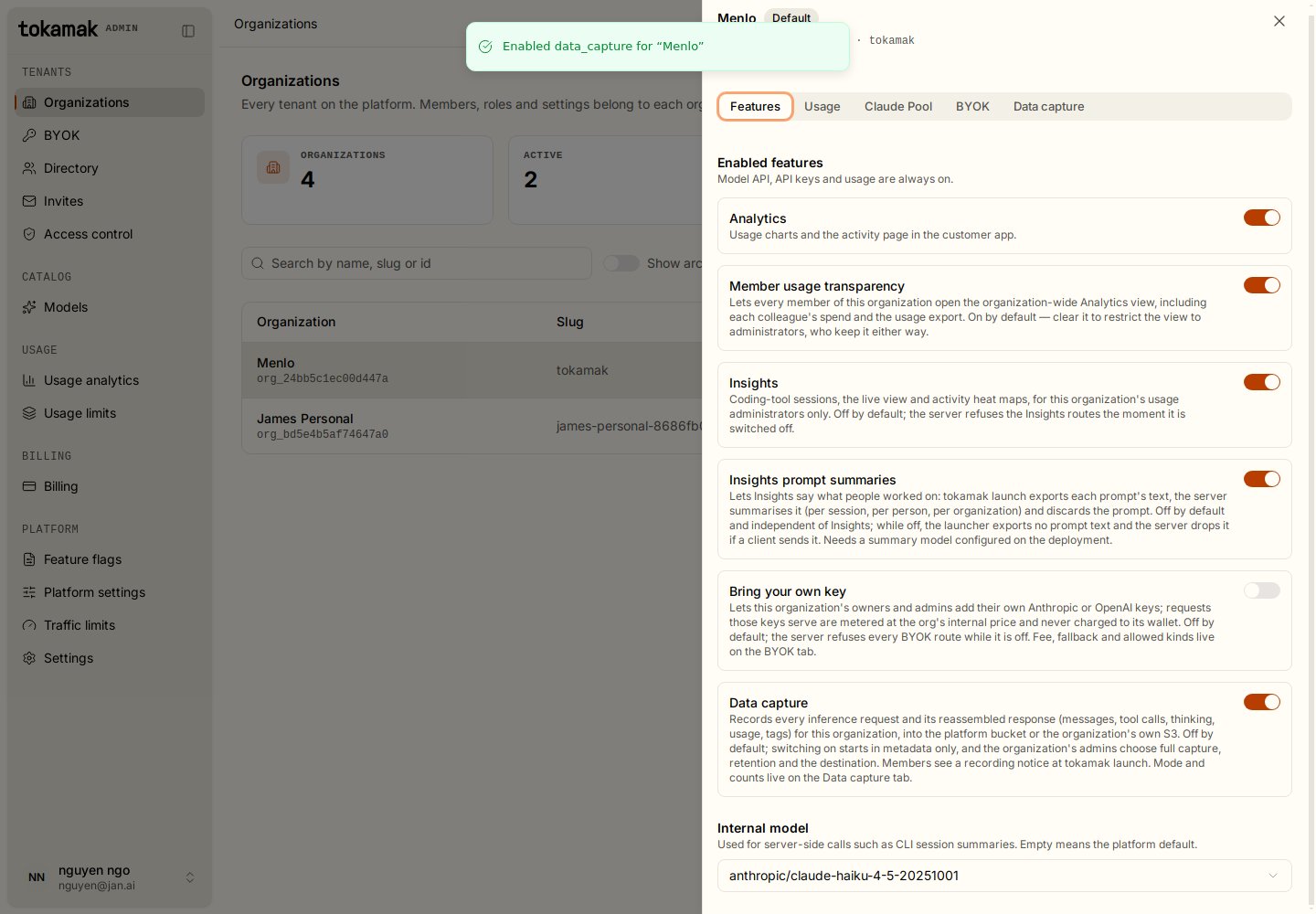
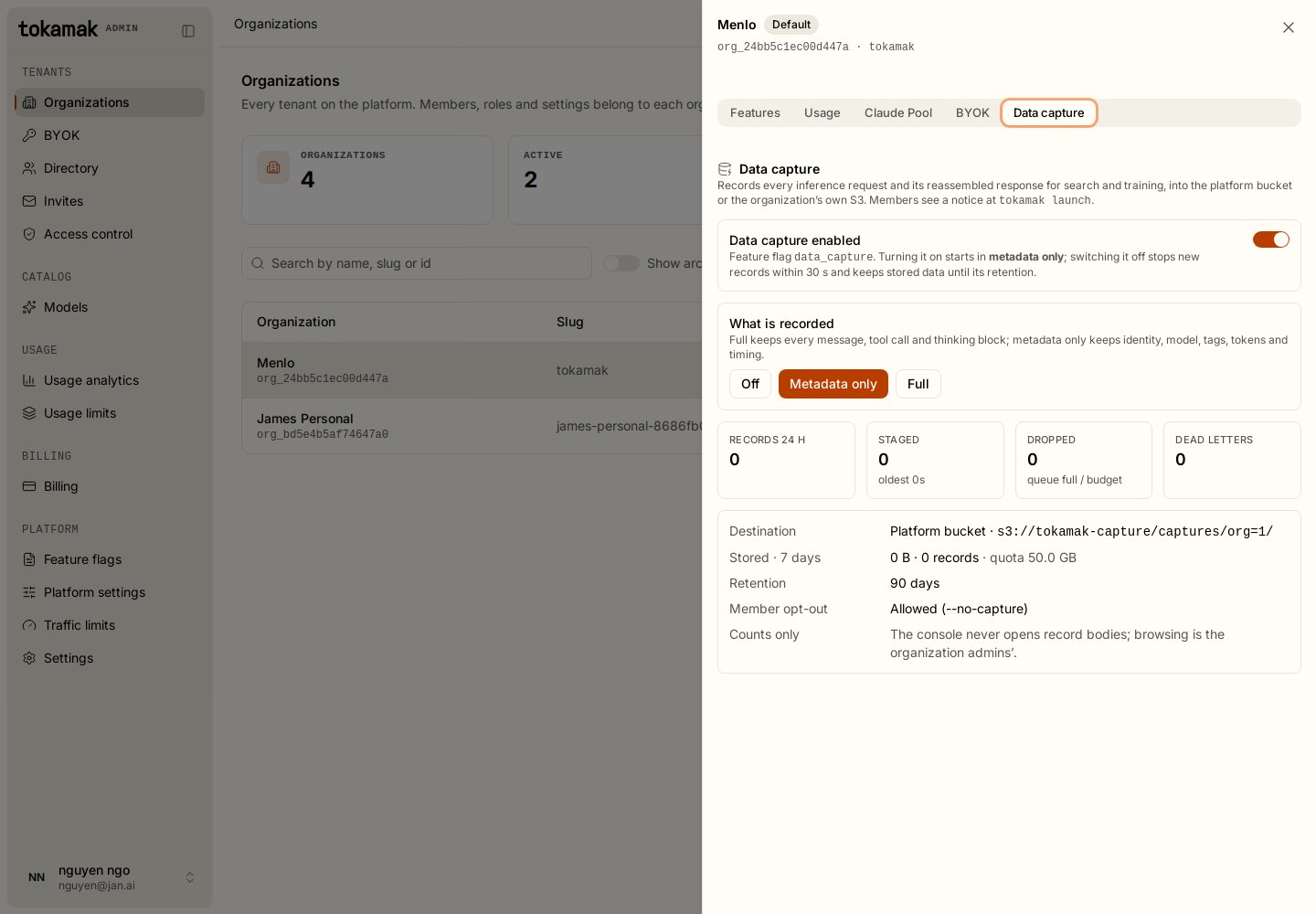
A switch takes effect within 30 seconds. Switching off stops new records and keeps stored data until its retention.
2. Decide what is kept (organization administrator)
In the app open Settings → Data capture. You need org.admin.
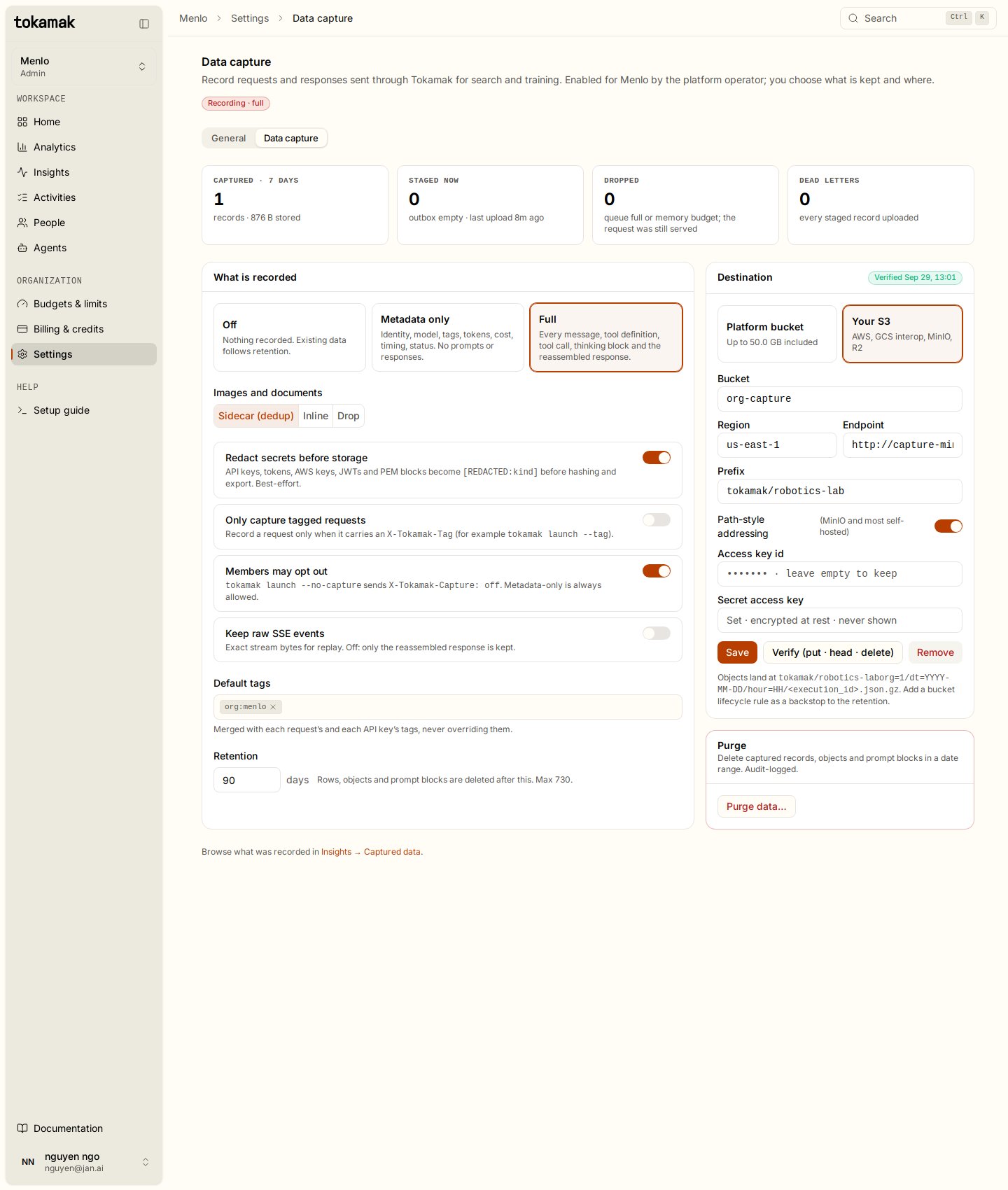
| Setting | Options | What it means |
|---|---|---|
| What is recorded | Off · Metadata only · Full | Metadata only keeps identity, model, tags, tokens, cost, timing and status, no prompts or responses. Full keeps every message, tool definition, tool call, thinking block and the reassembled response. |
| Images and documents | Sidecar · Inline · Drop | Base64 images and documents inside prompts become content-addressed sidecar objects (deduplicated), stay inline, or are replaced by a marker. |
| Redact secrets before storage | on / off | API keys, tokens, AWS keys, JWTs and PEM blocks become [REDACTED:<kind>] before hashing, storage and export. Best-effort. |
| Only capture tagged requests | on / off | Record a request only when it carries a tag. Useful when you want experiments recorded and everyday work left alone. |
| Members may opt out | on / off | Honour tokamak launch --no-capture. Metadata only (--capture=metadata) is always honoured. |
| Keep raw SSE events | on / off | Also keep the exact stream bytes for replay. Off keeps only the reassembled response. |
| Default tags | list | Merged into every record's tags. They never displace a request's own tags. |
| Retention | 1 to 730 days | Rows, objects and prompt blocks are deleted after this. |
Destination
Platform bucket stores records in the deployment's bucket under a quota shown on the page. Your S3 stores them in a bucket you own on any S3-compatible service (AWS, GCS interop, MinIO, R2). Enter bucket, region, endpoint, prefix, path-style addressing and an access key; the secret is encrypted at rest and never shown again. Verify runs a put, head and delete with those credentials and records the result. A stored destination that stops working shows its last error here and records wait as dead letters until you fix it and retry.
The endpoint must be a public https host. Private, loopback, link-local and single-label hosts are refused so that Tokamak cannot be pointed at internal services.
Add a lifecycle rule on your bucket matching the retention as a backstop.
Purge deletes captured records, objects and prompt blocks in a date range. It is audit-logged, deletes objects first and keeps the index row of anything it could not delete so a repeated purge retries exactly that.
3. Tag what you collect
Tags are the labels your team filters, searches and exports by. Decide a convention before you start collecting; a useful one names the experiment, the task and the environment, for example exp:grasp-v3, task:pick-and-place, robot:ur5.
From tokamak launch
# One launch, two tags
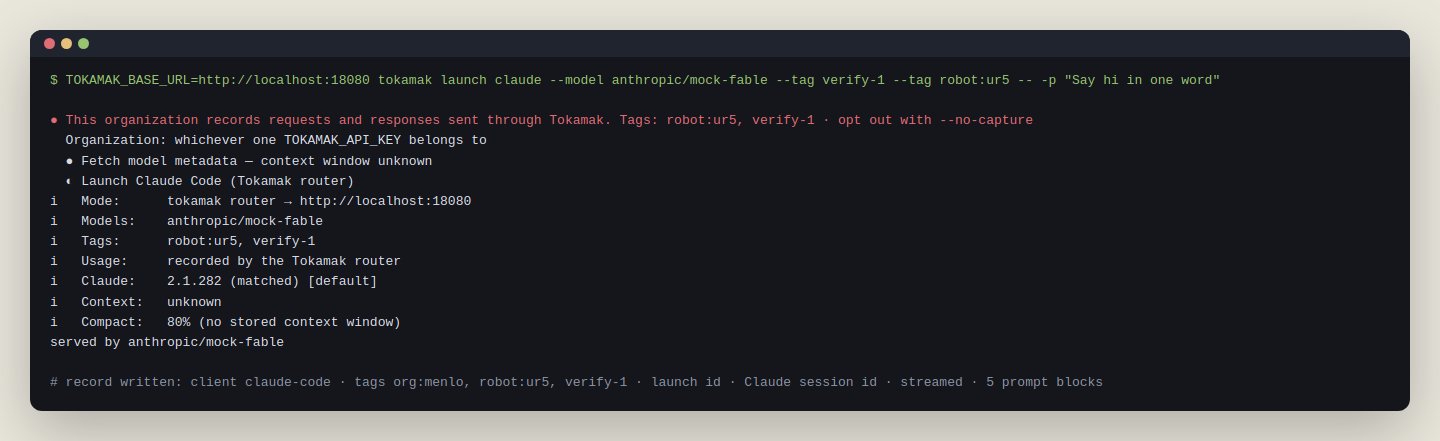
tokamak launch claude --tag exp:grasp-v3 --tag task:pick-and-place

# Comma list works too
tokamak launch codex --tag=exp:grasp-v3,robot:ur5

# Tag every launch from this machine by default
tokamak config set-tag team:robotics
tokamak config clear-tag
Without --tag the launcher uses TOKAMAK_TAG (comma list), then the saved default tags. The first source present wins; they are not merged on the client. Every agent tokamak launch starts (Claude Code, Cowork, Codex, Copilot, Jan Agent, Pi, Oh My Pi, OpenCode, Droid) sends the same tags on every request it makes.
From your own client
Send the X-Tokamak-Tag header on any request to /v1/chat/completions, /v1/messages or /v1/responses. Repeat the header or send a comma list.
curl https://<gateway>/v1/chat/completions \
  -H "Authorization: Bearer $TOKAMAK_API_KEY" \
  -H "X-Tokamak-Tag: exp:grasp-v3, task:pick-and-place" \
  -d '{"model": "anthropic/claude-sonnet-5", "messages": [{"role": "user", "content": "..."}]}'
Tags are normalised on the server: split on commas, trimmed, lower-cased, kept only when they match ^[a-z0-9][a-z0-9._:/@-]{0,63}$, de-duplicated, sorted, at most 16. Anything else is dropped, never rejected; the request still serves and the record counts the dropped values in tags_rejected. Tags are labels, never authorization, routing or pricing, and providers never see them.
Tags also appear in Analytics as a Tags breakdown, so you can see requests, tokens and cost per experiment without opening a single record.
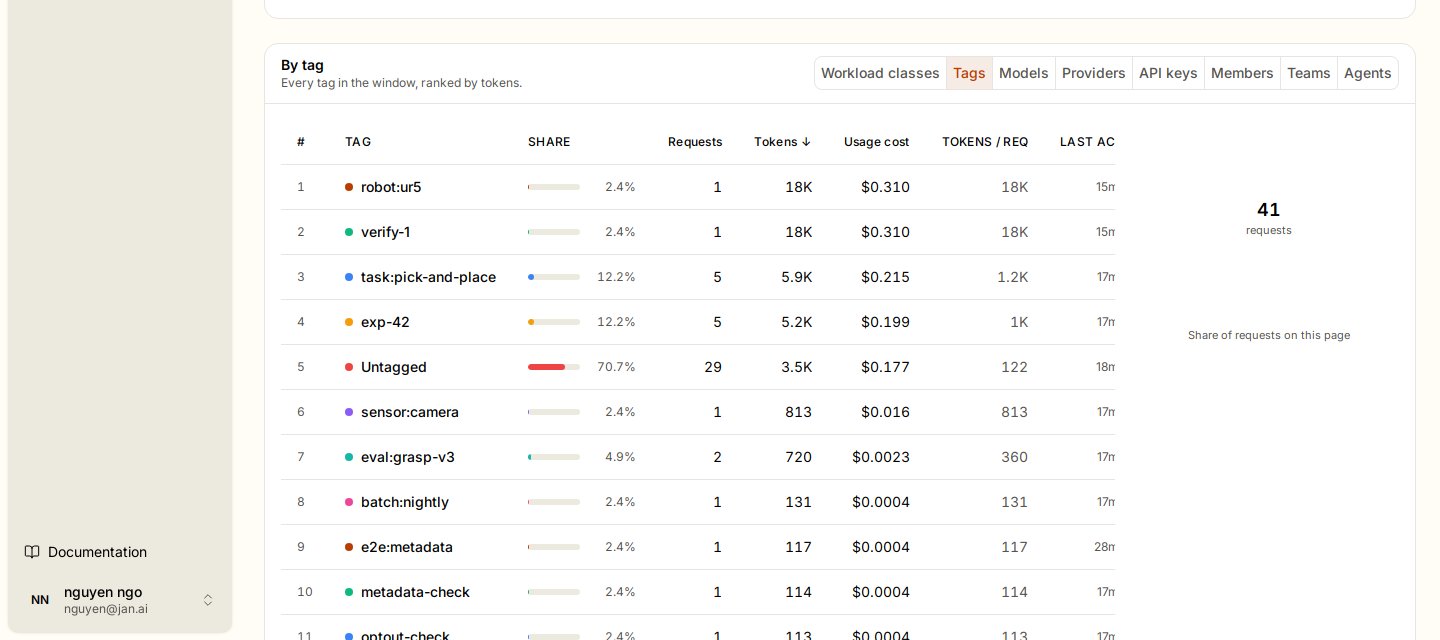
4. What gets recorded, and when
Once capture is on, every request made with an API key of the organization is a record: successes, upstream errors, transport failures, cancelled and cut streams (marked partial). The decision per request is:
capture = feature on && mode != off
          && !(require_tag && the request has no tags)
          && !(members may opt out && X-Tokamak-Capture: off)
          && the agent's own setting is not Off
mode    = X-Tokamak-Capture: metadata ⇒ metadata only for this request
          the agent's own setting is Metadata only ⇒ metadata only
An agent's own data capture setting is applied last. It can only lower what is recorded, and no header or tag raises it. Use it to keep a bot that handles sensitive data out of Captured data.
A record appears in Captured data one to two seconds after the response finishes. The pipeline is off the request path: the request never waits for capture, and a slow or unreachable bucket costs nothing to the inference call. Records wait durably in an outbox until the bucket accepts them; if the queue overflows during a burst the request still serves and the loss is counted as Dropped on the settings page.
A record is captured at most once, so a dropped_count above zero means data is missing, not duplicated. Bucket failures never drop data: rows wait, then become Dead letters you can retry once the destination is fixed.
The record
{
  "envelope_version": 1, "execution_id": "…", "captured_at": "…",
  "capture_mode": "full", "content_omitted": false,
  "identity": {"organization_id": 1, "user_id": "42", "team_id": 3, "api_key_id": "…"},
  "client":   {"client_name": "claude-code", "launch_id": "…", "client_session_id": "…",
               "tags": ["exp:grasp-v3", "task:pick-and-place"], "tags_rejected": 0, "request_id": "…"},
  "routing":  {"route": "/v1/messages", "dialect": "anthropic_messages", "stream": true,
               "model_requested": "…", "model_upstream": "…", "provider": "…"},
  "request":  {"bytes": 41204, "sha256": "…", "headers": {…},
               "body": {"fields": {…}, "tools_ref": "sha", "system_refs": ["sha"], "message_refs": ["sha", "…"]}},
  "response": {"status": 200, "terminal_event": "message_stop", "partial": false, "final": {…}},
  "usage":    {"prompt_tokens": 4, "completion_tokens": 1811, "cache_read_tokens": 39880, "cache_creation_tokens": 1102},
  "timing":   {"started_at": "…", "ended_at": "…", "duration_ms": 8400, "time_to_first_token_ms": 1900},
  "redaction": {"enabled": true, "method": "regex", "version": "v1", "count": 1}
}
Prompts are stored as content-addressed blocks: the tool list, each system block and each message is written once per organization and referenced by hash, so a 200-turn coding session stores each earlier turn once instead of 200 times. The app and the exports rehydrate them for you. Reading the bucket directly, follow the *_refs to blocks/.
What members see
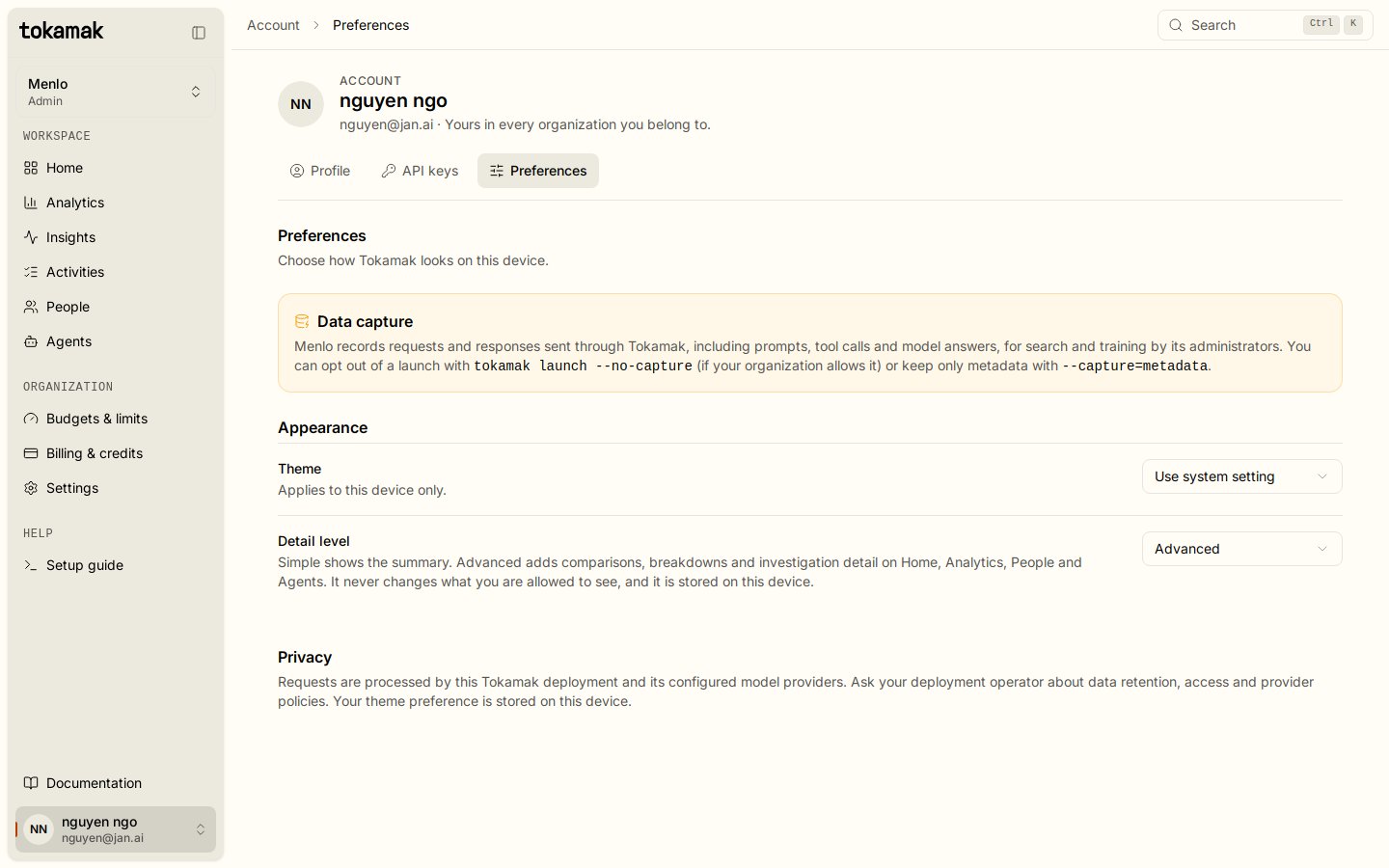
tokamak launch claude --no-capture          # opt this launch out (when the organization allows it)
tokamak launch claude --capture=metadata    # keep the usage row, omit content
TOKAMAK_CAPTURE=off tokamak launch codex    # environment fallback
5. Browse and search
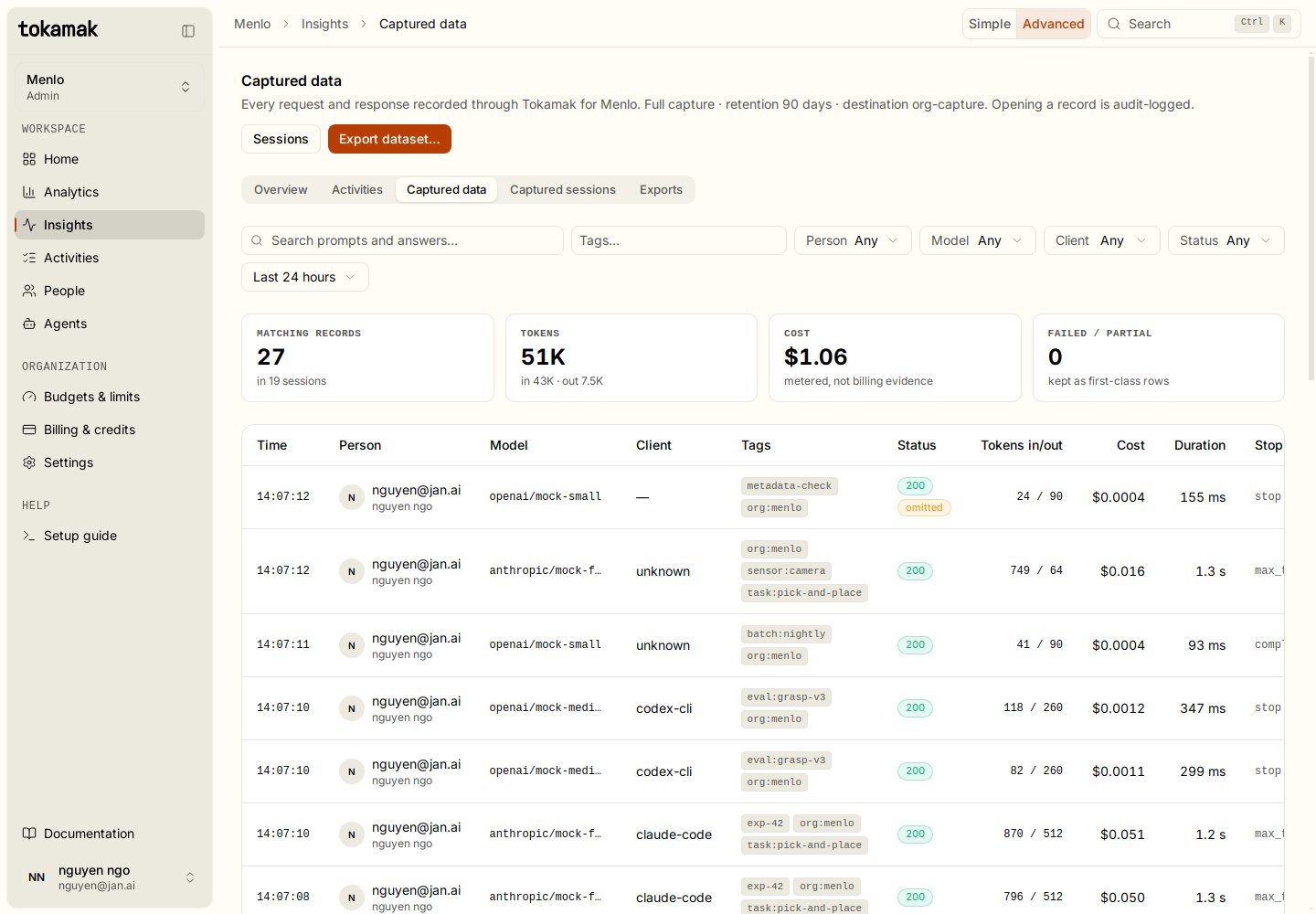
Open Insights → Captured data. It lists every record with time, person, model, client, tags, status, tokens, cost and duration. Filter by tag, person, model, client, status and time window, or search the text of the first user turn and the last assistant answer. The tiles at the top count the matching records and their sessions, tokens and metered cost.
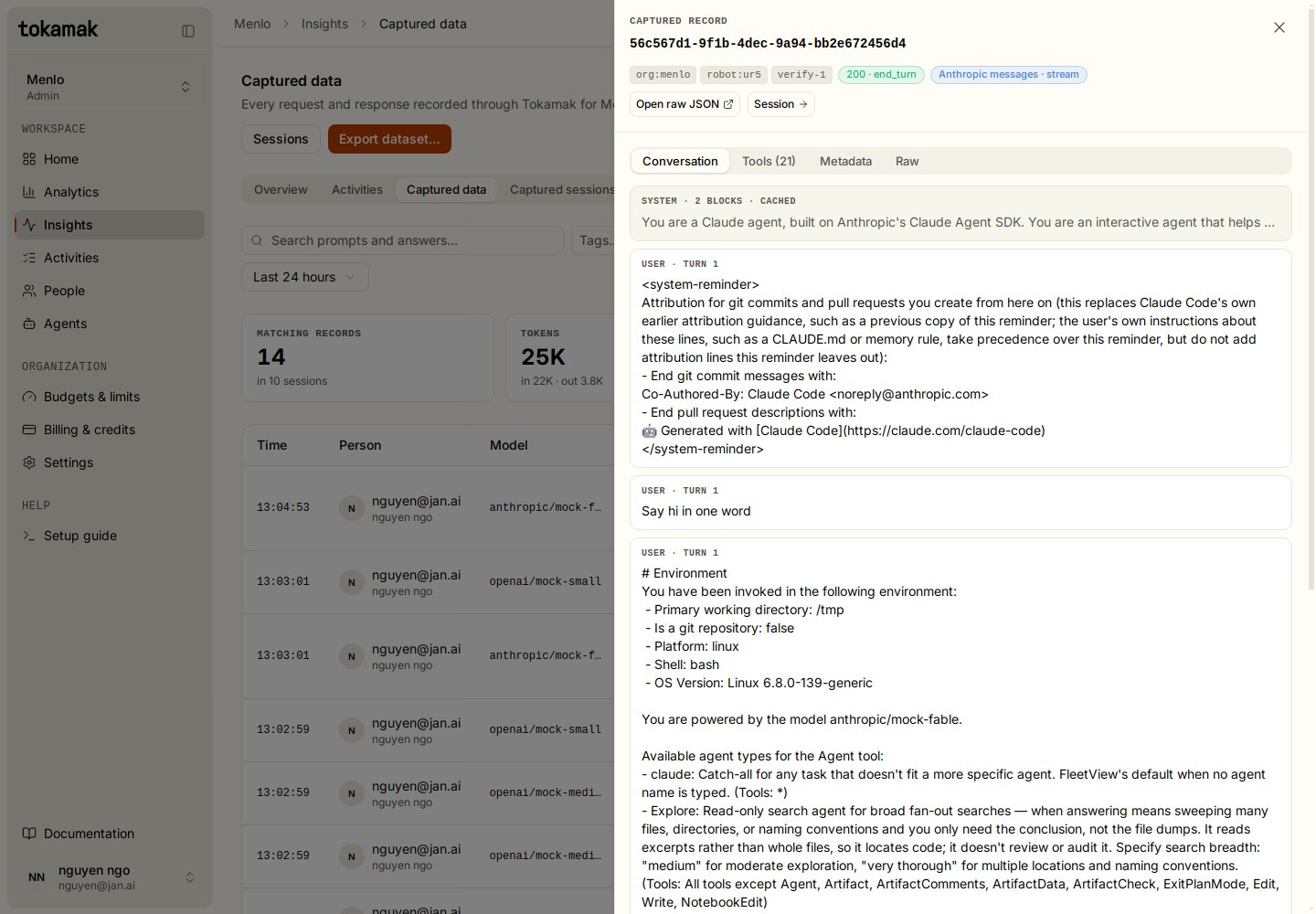
Click a row to open the record: the Conversation rebuilt from the prompt blocks (system, each user and assistant turn, tool calls and results, thinking), the Tools the client offered, Metadata (identity, routing, timing, usage, redaction) and the Raw envelope. Open raw JSON gives a time-limited link to the object itself.
6. Sessions and labels
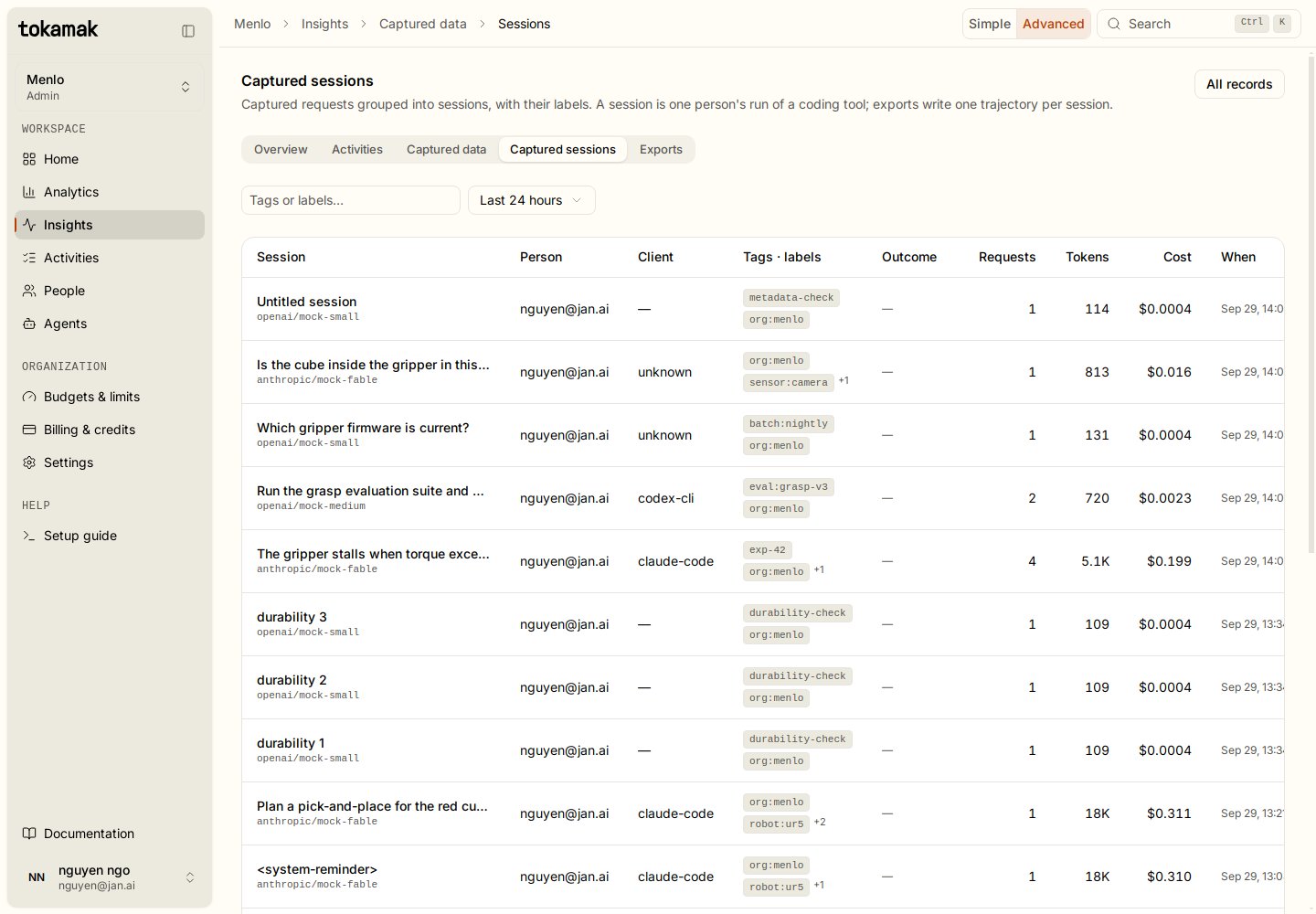
A session is one run of a coding tool: records sharing the client's session id (or the launch id when the client sends none). Insights → Captured sessions lists them with their first prompt, person, client, tags, labels, outcome, requests, tokens and cost.
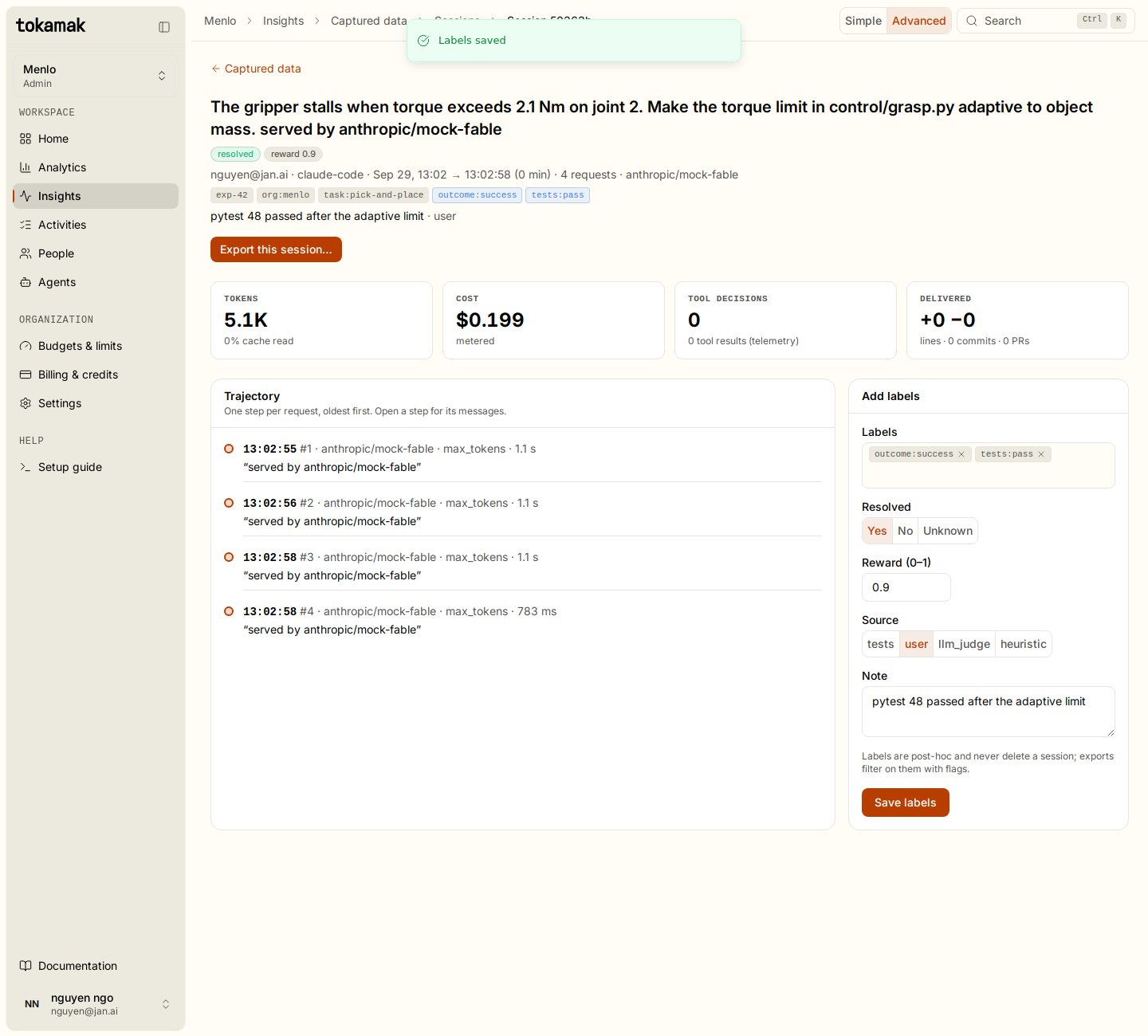
Open a session to see its trajectory, one step per request, and to label it:
- Labels: free tags such as
outcome:successortests:pass. - Resolved: yes, no or unknown. Exports can keep resolved sessions only.
- Reward: 0 to 1.
- Source: who judged it (tests, user, LLM judge, heuristic).
- Note: free text.
Labels can also be written by a script, for example from your CI after the tests ran:
curl -X POST https://<gateway>/v1/admin/active-org/captures/sessions/<session_key>/labels \
  -H "Authorization: Bearer $MANAGEMENT_KEY" \
  -d '{"labels": ["tests:pass"], "resolved": true, "reward": 0.9, "label_source": "tests", "note": "48 passed"}'
7. Export a dataset
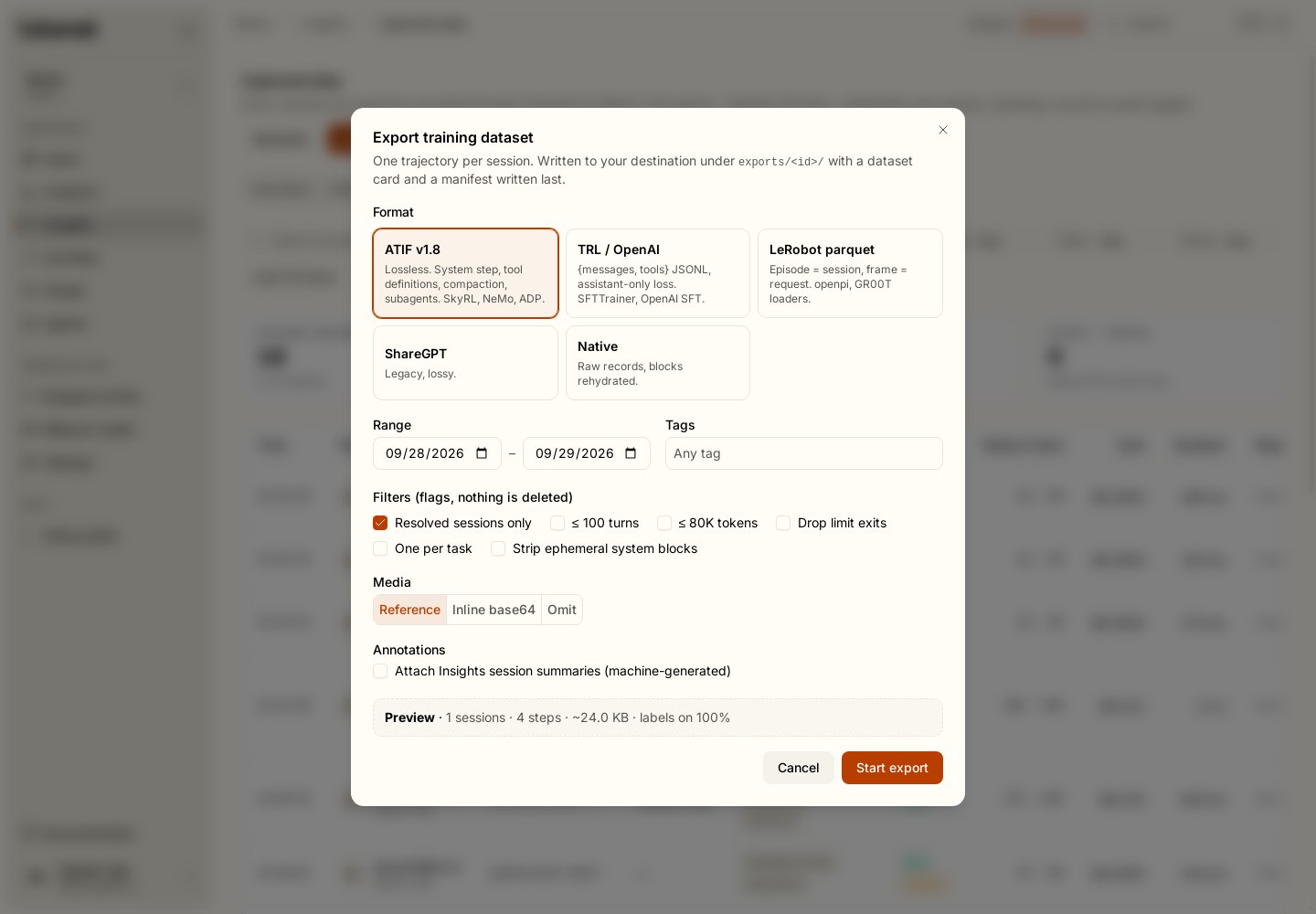
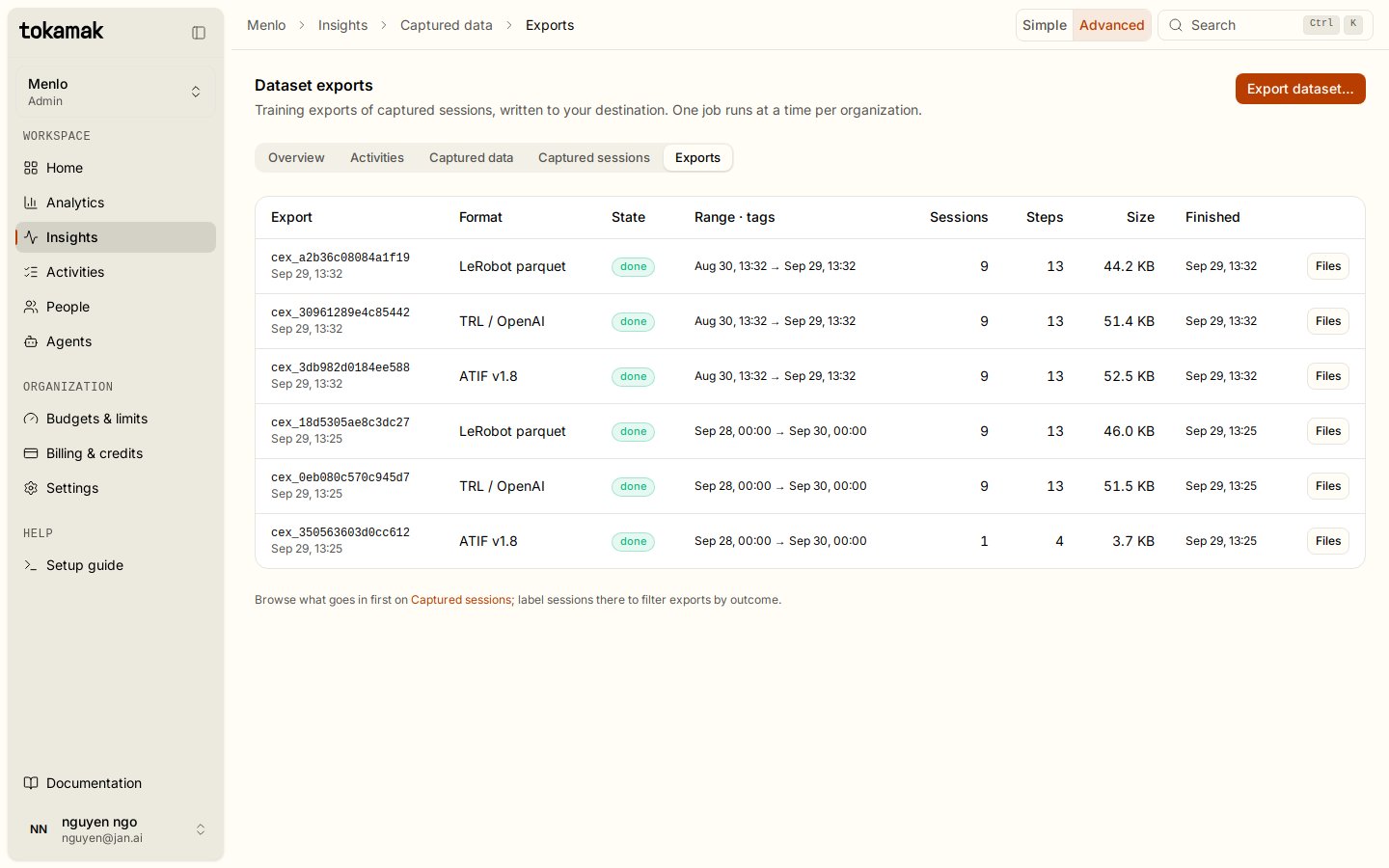
Export dataset… on Captured data, or Export this session… on a session, queues an export. One export runs at a time per organization. It writes one trajectory per session to your destination under exports/<export_id>/, followed by a dataset card and, last, the manifest.
| Format | Files | Use it for |
|---|---|---|
| ATIF v1.8 (default) | data/part-NNNNN.jsonl.gz | Lossless agent trajectories: tool definitions, a system step, user and agent steps with reasoning, tool calls and observations, per-step metrics, compaction as a system step. SkyRL, NeMo, ADP. |
| TRL / OpenAI | data/part-NNNNN.jsonl.gz | {messages, tools} in the OpenAI chat convention with per-message loss (assistant turns true). SFTTrainer, OpenAI fine-tuning. One line per compaction segment. |
| ShareGPT | data/part-NNNNN.jsonl.gz | {conversations:[{from, value}]} with <think>, <tool_call> and <tool_response> tags. Legacy loaders; lossy. |
| LeRobot parquet | data/chunk-000/file-000.parquet, meta/… | Episode = session, frame = request; messages and response as JSON strings, next.success = resolved. openpi, GR00T loaders. |
| Native | data/part-NNNNN.jsonl.gz | The rehydrated record envelopes, one per line. Your own tooling. |
Filters select, never delete: resolved sessions only, at most N turns, at most N tokens, drop sessions that ended on a limit, one session per task:* tag, strip ephemeral system blocks. Media writes images as typed tokamak-blob:<sha> references, inline data URIs, or omits them. Annotations attaches the Insights session summary when your organization has prompt summaries on.
Every export line carries a _tokamak block (session key, person, client, models, start and end time, step count, token totals, cost, exit reason, tags, labels, resolved, reward) so a row can always be traced back to its session and filtered after the fact.
Reading an export
manifest.json is written last: a reader that finds it finds every part. README.md is a Hugging Face dataset card with the licence placeholder, tags, size, and the personal and sensitive information section to fill in.
import gzip, json, s3fs

fs = s3fs.S3FileSystem(endpoint_url="https://s3.example.com")
root = "my-capture-bucket/tokamak/org=1/exports/cex_3db982d0184ee588"
manifest = json.load(fs.open(f"{root}/manifest.json"))

trajectories = []
for f in manifest["files"]:
    if f["name"].startswith("data/"):
        with gzip.open(fs.open(f"{root}/{f['name']}", "rb"), "rt") as fh:
            trajectories += [json.loads(line) for line in fh]

print(manifest["sessions"], "sessions,", manifest["steps"], "steps")
print(trajectories[0]["extra"]["_tokamak"]["tags"])
A TRL export loads straight into datasets:
from datasets import load_dataset
ds = load_dataset("json", data_files="data/part-*.jsonl.gz", split="train")
# ds[0]["messages"], ds[0]["tools"], ds[0]["_tokamak"]
8. Reading the bucket directly
The store is laid out for query engines, so you never need an export to analyse it:
<prefix>/org=<id>/dt=<YYYY-MM-DD>/hour=<HH>/<execution_id>.json.gz   record envelopes
<prefix>/org=<id>/blocks/<sha[0:2]>/<sha>.json.gz                     prompt blocks
<prefix>/org=<id>/blobs/<sha[0:2]>/<sha>                               images and documents
<prefix>/org=<id>/sessions/<hash>.manifest.json                        session manifests
<prefix>/org=<id>/exports/<export_id>/…                                exports
-- DuckDB: requests, tokens and cost per tag for one day
INSTALL httpfs; LOAD httpfs;
SELECT unnest(client.tags) AS tag,
count(*) AS requests,
sum(usage.completion_tokens) AS out_tokens
FROM read_json_auto('s3://my-capture-bucket/tokamak/org=1/dt=2026-09-30/hour=*/*.json.gz')
GROUP BY 1 ORDER BY 2 DESC;Records reference prompts by hash (request.body.tools_ref, system_refs, message_refs); read the matching object under blocks/ to rehydrate. Blocks are canonical JSON after redaction: the store is lossless in content, not byte-exact in key order.
Privacy and governance
- Redaction runs before hashing and storage when it is on, so a hash never confirms a guessed secret. It skips only a thinking block's signature and a redacted thinking block's data. It is regex-based and best-effort; review before you publish a dataset.
- Audit. Every switch, settings, destination, retry and purge action, and every record opened, writes an admin audit entry.
- Access. Browsing, labelling and exporting require
org.adminin the app or a management key. Platform administrators see counts, never bodies. Members see their own recording notice and control their own launches. - Retention deletes the object first, then the index row; a failed delete is retried on the next sweep.
- Not captured: token ids and logprobs (no provider returns them), local tool execution (the next request carries whatever result the agent chose to send), anything a client sends outside Tokamak.
Nothing is being captured?
| Symptom | Check |
|---|---|
| Records list stays empty after launches | The API key's organization. A key belongs to one organization for life; tokamak org current shows which one the CLI is using, tokamak org switch <id> changes it. Traffic from a key of another organization is never captured here. |
| Only some launches appear | Only capture tagged requests is on and those launches sent no tag; or the member launched with --no-capture. |
| An agent's requests never appear | That agent's Data capture is Off (or Metadata only, which keeps no content). Settings → Data capture lists every agent whose capture is lowered. |
| Records appear then stop | Dead letters or last error on the destination: credentials or bucket changed. Fix, then retry dead letters from the settings page. |
| Dropped climbs | A burst overflowed the queue or the memory budget on a replica. Requests were served; those records are gone. Ask the operator about CAPTURE_QUEUE_SIZE and CAPTURE_MEMORY_BUDGET_BYTES. |
response.omitted: true on a record | The response was larger than the per-replica budget; a 64 KiB preview was kept. |
reassembly_error set | The provider sent an event shape Tokamak does not know. The raw stream text is kept for that record. |
API
Everything the app does is available to scripts with a management key. Paths are relative to the gateway.
| Method | Path | Purpose |
|---|---|---|
| GET / PUT | /v1/admin/active-org/capture-settings | Read or change mode, images, redaction, tags, retention, opt-out |
PUT / DELETE / POST …/verify | /v1/admin/active-org/capture-destination | Set, remove or probe the organization bucket |
| GET | /v1/admin/active-org/captures | List records (q, tags, user_id, model, client, status, from, to) |
| GET | /v1/admin/active-org/captures/records/:executionId | One record with its conversation and a presigned object link |
| GET | /v1/admin/active-org/captures/sessions[/:sessionKey] | Sessions and one session's trajectory |
| POST | /v1/admin/active-org/captures/sessions/:sessionKey/labels | Label a session |
| POST / GET | /v1/admin/active-org/captures/exports[/:id] | Queue an export, read its state and file links; GET …/exports/preview counts a selection |
| POST | /v1/admin/active-org/captures/dead-letters/retry | Retry records the bucket refused |
| POST | /v1/admin/active-org/captures/purge | Delete a date range ({from, to}), optionally one person's or agent's records only (user_id) |
See the engineering reference for the full envelope, the pipeline's guarantees and the deployment settings: data-capture.md and tags.md.
Insights
See who is coding through Tokamak right now, and when your organization, a team or one person works, from the telemetry coding tools already send.
Guardrails
Screen what your organization sends to models. Find secrets, personal data and denylisted content in prompts, tool results and answers, and flag, mask, cloak or block it, with no client changes.