
Configure auto routing
Set up the policy behind tokamak/auto in the admin console. Choose tiers and models, the classifier, kinds of work and strengths, and follow-up settings, and try them before your users do.
Platform administrators manage routing policies in the admin console under Models › Auto router, or through the admin API. Doing either needs the admin.models.manage permission.
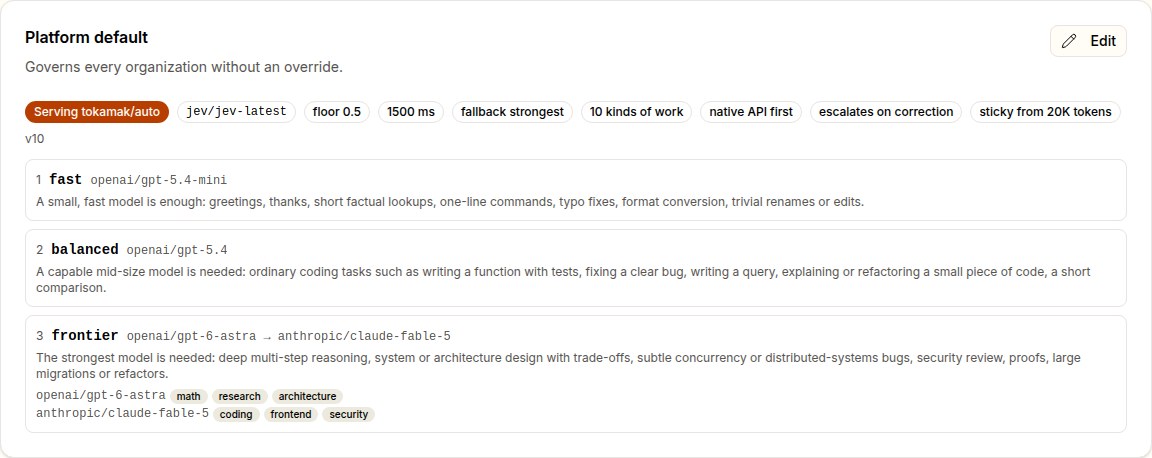
- The platform default governs every organization that has no policy of its own. Until a platform default or an organization's override is enabled,
tokamak/autoanswers404for that organization and is not listed. - An organization override replaces the default entirely for one organization. It can narrow the candidates, change the bar, or switch
tokamak/autooff for that organization alone. Removing the override hands the organization back to the platform default.
Before you start
- A classifier is connected. Add TypeSafe as a provider of kind
jev, so thatjev/jev-latestis in the catalog; see System One. A synced Jev model gets TypeSafe's list price, 42 µUSD per 1,000 input tokens, unless the provider states its own; keep it priced so the report can price classifications. - The candidate models are in the catalog, active and priced. Savings in the report are computed only where the strongest tier's model has a catalog price and the request's own cost is known: the served model's catalog price or, on a billed request, its full charge.
- The candidates speak your clients' APIs. Tokamak forwards each API as it is and does not translate. Claude Code needs candidates served through the Messages API, and Codex needs the Responses API. A request routed to a model that cannot answer its API fails exactly as it would if the client had named that model.
- Access policies are in place. The router never sends a request to a model that an access policy which blocks refuses the caller. A candidate the caller cannot reach is skipped. Only
tokamak/autoreads access policies: a request that names a model directly is not checked against them, and they have no console page or API yet. - You know who goes first. Many deployments start with one organization's override as a pilot, watch its report, then create the platform default.
1. Create the policy
Choose Create on the platform default, or pick an organization from Add override…. The editor opens with a starting draft:
- the three evaluated tiers (fast, balanced, frontier) with their descriptions;
- the ten kinds of work;
- the API-family preference;
- both follow-up settings.
An organization's override starts from the platform default when there is one. The draft does not serve anything until you switch on Serve tokamak/auto and save.
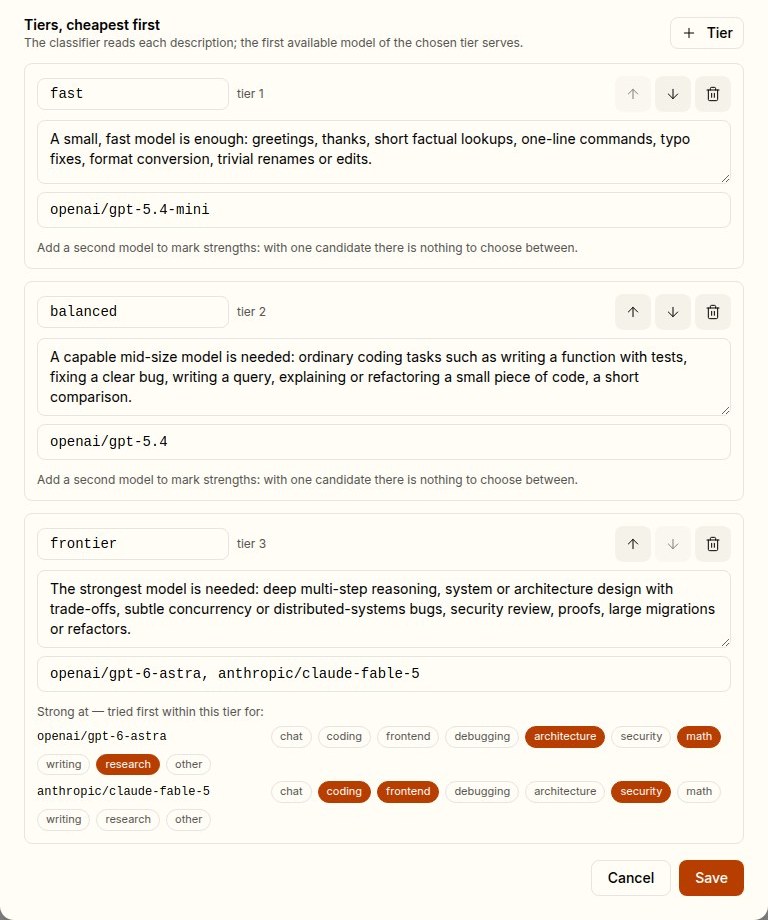
2. Tiers and models
Tiers are the heart of the policy. They are ordered cheapest first, and that order is also the escalation order.
| Rule | Limit |
|---|---|
| Tiers per policy | 2 to 6 |
| Tier name | Up to 32 characters: lowercase letters, digits, -, _ |
| Tier description | Required, up to 600 characters |
| Models per tier | 1 to 8 catalog IDs; not a classifier model and not tokamak/auto itself. A model may sit in more than one tier |
The description is all the classifier knows about a tier. The classifier is asked which tier is the cheapest one that would answer the request well, and it judges against your descriptions. Some guidance:
- Describe the work each tier is enough for, with concrete examples.
- Keep neighbouring tiers clearly apart.
- Start from the defaults, which routed all 34 prompts of the evaluation correctly:
| Tier | Default description |
|---|---|
| fast | A small, fast model is enough: greetings, thanks, short factual lookups, one-line commands, typo fixes, format conversion, trivial renames or edits. |
| balanced | A capable mid-size model is needed: ordinary coding tasks such as writing a function with tests, fixing a clear bug, writing a query, explaining or refactoring a small piece of code, a short comparison. |
| frontier | The strongest model is needed: deep multi-step reasoning, system or architecture design with trade-offs, subtle concurrency or distributed-systems bugs, security review, proofs, large migrations or refactors. |
List models in order of preference. The first model that can serve does serve, unless a strength or the API preference puts another first. List fallbacks after it: a model that is down, refused by an access policy, or too small for the request yields to the next.
3. Classifier settings
| Setting | Range | Default | What it does |
|---|---|---|---|
| Classifier | A catalog model served by a jev provider | jev/jev-latest | The System One model that answers the questions |
| Confidence floor | 0 to 1 | 0.5 | Below it, the classified tier is escalated one step |
| Classifier timeout | 100 to 10,000 ms | 1,500 ms | Past it, the fallback tier serves |
| Fallback tier | Any tier | The strongest | Serves requests the classifier could not judge |
The confidence floor trades cost for safety. In the evaluation, a floor of 0.5 routed every prompt correctly. At 0.3 it missed the one hard prompt the classifier had been unsure about, and at 0.7 it sent three prompts to a stronger tier than they needed. A warm classifier call takes about 250 to 300 ms, so the default timeout leaves room. If the report shows a noticeable fallback rate, raise the timeout before anything else.
4. Kinds of work and strengths
A tier with several models can send different work to different models. For example, the frontier tier can send math and research to one model and coding, front-end work and security to another.
- Switch on Route by kind of work. The classifier then also names the kind of work, in the same call. The ten default kinds are chat, coding, frontend, debugging, architecture, security, math, writing, research, and other as a catch-all. Edit their descriptions or add your own: 2 to 12 kinds, each with a name like a tier's and a description of up to 300 characters.
- Set the kind-of-work confidence floor (0.5 by default). Below it the kind is recorded but does not reorder the tier.
- Under each tier with two or more models, mark which kinds each model is strong at. For a request of a marked kind, the models strong at it go first, in their listed order.
The editor warns when a strength cannot change anything. An example is when only the tier's first model is marked and the API-family preference is off: that model goes first anyway.
Set strengths from evidence, not reputation. The routing report's kind of work × model table shows how each kind fared on each model. Watch it for a while before marking strengths, and revisit the marks when it changes. Asking the kind of work adds about 300 input tokens to each classification.
5. Prefer the request's API family
With Prefer the request's own API family on, a tier's candidates are ordered by the API the request arrived on:
- Messages requests (Claude Code) try
anthropic/*models first. - Responses requests (Codex) try
openai/*models first. - Chat Completions keeps the listed order, because nearly every family serves it too.
It matters when a tier mixes vendors, so that each client meets the family it was built around. A strength outranks it.
6. Follow-up turns
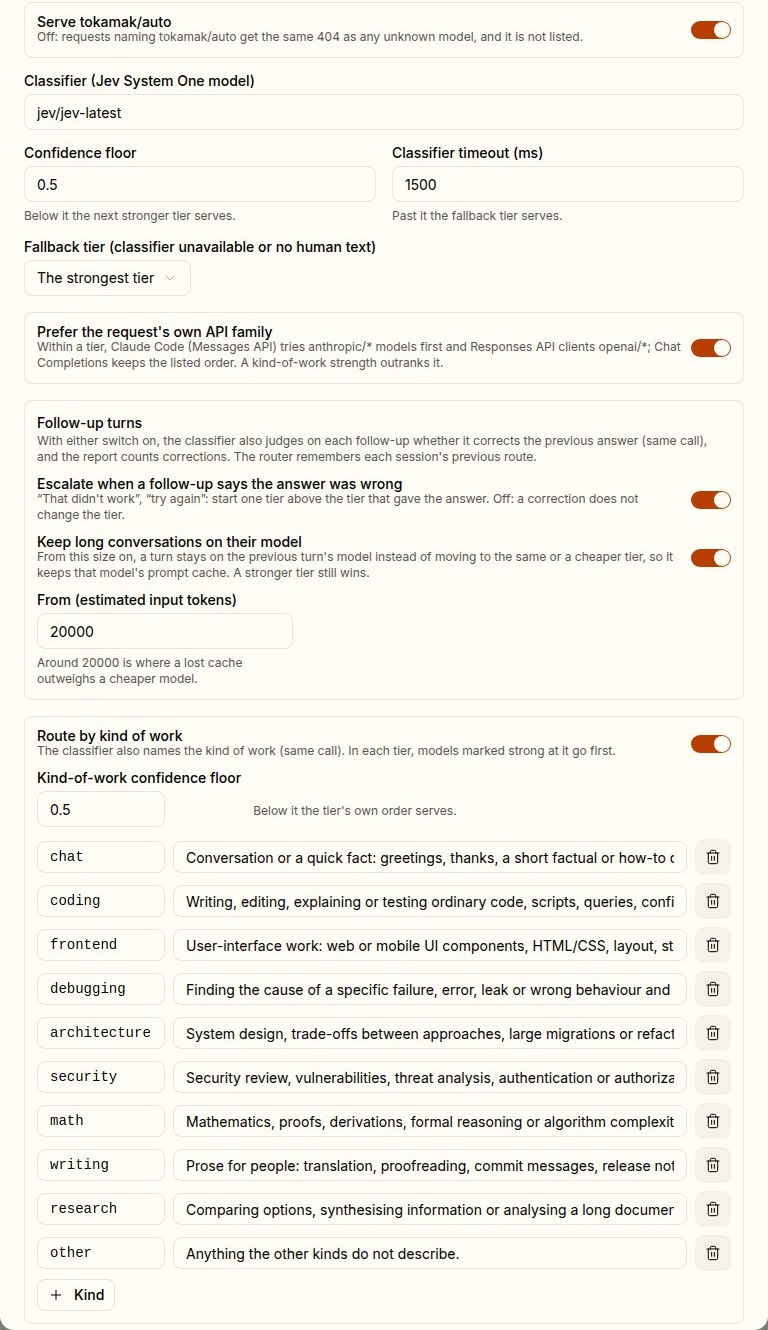
Escalate when a follow-up says the answer was wrong. Examples are "That didn't work", "try again" and "you missed one". The follow-up then starts one tier above the tier that gave the answer. When that answer already came from the strongest tier, it stays there. With the setting off, a correction does not change the tier.
Keep long conversations on their model. Set the threshold in estimated input tokens. When a turn reaches it and would move to another model of the same tier or a cheaper one, it stays on the model that answered the previous turn instead, keeping that model's prompt cache. The trade-off:
- With many providers a cache read costs about a tenth of fresh input. So staying is cheaper whenever the cheaper model's input price is above a tenth of the current model's.
- At around 20,000 tokens that is almost always true, which is why new policies start there.
- A turn that needs a stronger tier still moves up, and a correction never stays put.
Either setting also turns on the correction question. On every follow-up the classifier then judges whether it corrects the previous answer, which costs about 90 more input tokens. The report starts counting corrections against the route that gave the answer. With both settings off, which is how every policy created before these settings existed stays, the classifier call is exactly what it was. Both depend on the router knowing the conversation's previous turn; see Conversations and sessions.
7. Try a prompt
Try a prompt, below the policies, runs the saved policy of the platform or an organization against a sample conversation. It shows the decision a real request would get. Nothing is forwarded to a model, and no cache or conversation memory is touched.
| Field | Use |
|---|---|
| Policy | The platform default, or an organization's override |
| Arrives on | Chat Completions, Messages (Claude Code) or Responses (Codex); what the API-family preference orders by |
| Earlier prompts | Up to five earlier messages of the conversation, separated by a blank line |
| Earlier prompts answered by | The model that answered them, as a conversation would remember it: shows a correction's escalation |
| Conversation size | Tokens to assume: shows stickiness and the context-window check |
| Prompt | The message to route |
The result shows:
- the model and tier;
- the reason;
- the classifier's confidence and its probability for each tier;
- the kind of work, and why the model was picked;
- whether the prompt corrects the previous answer and whether the conversation stayed on its model;
- the classifier's version, latency and input tokens;
- the strongest-tier alternative the report uses as its baseline;
- every candidate passed over, and why.
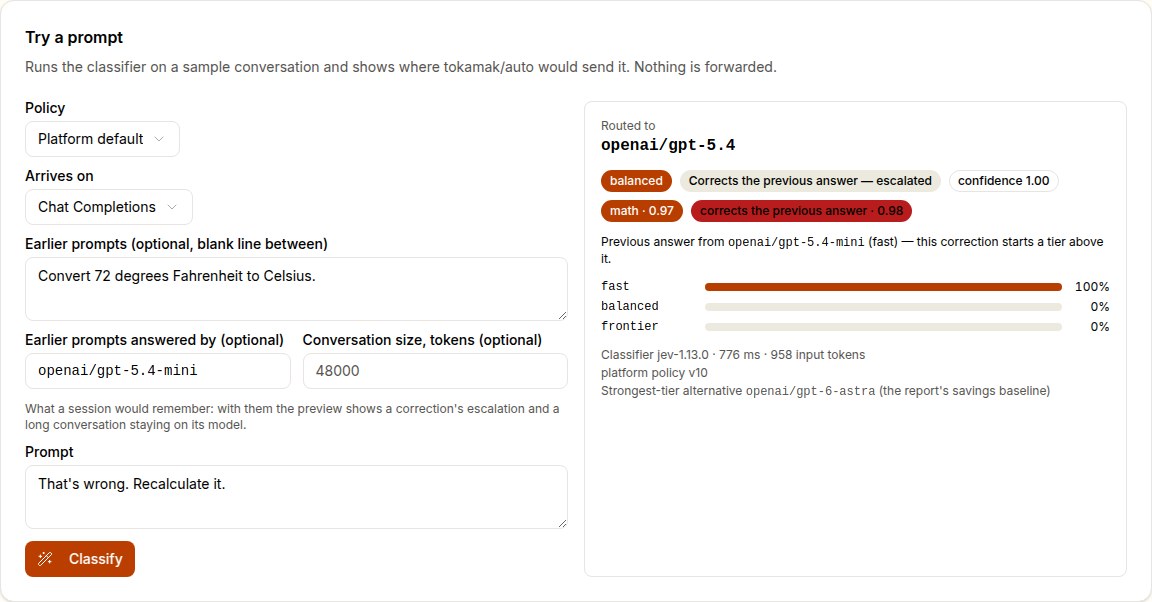
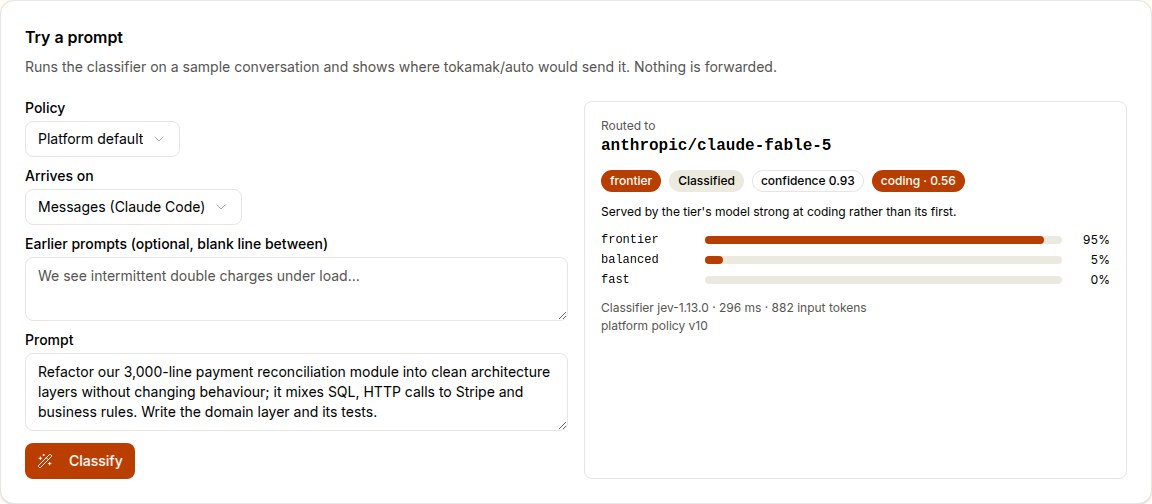
Previews always call the classifier, even while a live policy is backing off after a failure. That makes them a quick way to check whether the classifier has recovered.
8. Switch it on and roll out
Switch on Serve tokamak/auto and save. Each save gives the policy a new version.
- It applies at once on the server that saved it, and within 15 seconds everywhere.
- The routing report lists every version seen in its window, so you can tell which figures belong to which policy.
For organizations it governs:
GET /v1/modelsliststokamak/autolast, as Tokamak Auto.- Its context length and maximum output are the smallest among the candidates, so clients that size their requests from the listing stay safe whichever model serves.
To take tokamak/auto away from one organization only, give it an override with Serve tokamak/auto off.
Policy reference
The "If omitted" column is also what a policy saved before a field existed has. The last column is what the console's new-policy draft starts with.
| Field | Meaning | Range | If omitted | Console draft |
|---|---|---|---|---|
enabled | Serve tokamak/auto | on/off | off | off |
classifier_model | The System One model | a jev catalog model | jev/jev-latest | jev/jev-latest |
min_confidence | Tier confidence floor | 0–1 | 0.5 | 0.5 |
classifier_timeout_ms | Classifier deadline | 100–10,000 | 1,500 | 1,500 |
fallback_tier | Tier for unjudged requests | a tier name; empty is the strongest | the strongest | the strongest |
tiers[] | name, description, models[], optional strengths | 2–6 tiers | required | fast, balanced, frontier |
tiers[].strengths | Model → kinds of work it goes first for | kinds from tasks | none | none |
tasks[] | Kinds of work: name, description | none, or 2–12 | none | the ten defaults |
task_min_confidence | Kind-of-work floor | 0–1 | 0.5 | 0.5 |
prefer_native_api | API-family preference | on/off | off | on |
escalate_on_correction | Escalate a correction | on/off | off | on |
sticky_min_context_tokens | Stickiness threshold; 0 is off | 0–2,000,000 | 0 | 20,000 |
A save is validated before it is stored:
- the classifier must be a
jevmodel; - every candidate must be a catalog model that is not one;
- tier and kind names must be unique;
- a strength must name a model of its tier and a kind of the policy.
A rejected save answers 400 with the field that is wrong.
Admin API
The console uses these endpoints on the gateway. They need a platform session with admin.models.manage:
| Method and path | Does |
|---|---|
GET /v1/admin/models/router | Every policy, plus the defaults a new policy starts from |
PUT /v1/admin/models/router/platform | Create or replace the platform default |
PUT /v1/admin/models/router/organizations/{organizationId} | Create or replace one organization's override |
DELETE /v1/admin/models/router/organizations/{organizationId} | Remove an override |
POST /v1/admin/models/router/preview | Try a prompt. Send policy to preview an unsaved draft; also accepts earlier_prompts, dialect, previous_model and context_tokens |
{
  "enabled": true,
  "classifier_model": "jev/jev-latest",
  "min_confidence": 0.5,
  "classifier_timeout_ms": 1500,
  "tiers": [
    { "name": "fast", "description": "A small, fast model is enough: greetings, short lookups, trivial edits.",
      "models": ["openai/gpt-5.4-mini"] },
    { "name": "balanced", "description": "A capable mid-size model is needed: ordinary coding tasks.",
      "models": ["openai/gpt-5.4"] },
    { "name": "frontier", "description": "The strongest model is needed: deep reasoning, design, subtle bugs, proofs.",
      "models": ["openai/gpt-6-astra", "anthropic/claude-fable-5"],
      "strengths": { "openai/gpt-6-astra": ["math", "research", "architecture"],
                     "anthropic/claude-fable-5": ["coding", "frontend", "security"] } }
  ],
  "tasks": [
    { "name": "coding", "description": "Writing, editing, explaining or testing ordinary code." },
    { "name": "math", "description": "Mathematics, proofs, derivations or algorithm complexity." }
  ],
  "task_min_confidence": 0.5,
  "prefer_native_api": true,
  "escalate_on_correction": true,
  "sticky_min_context_tokens": 20000
}
The model names are examples; use IDs from your catalog. The tasks list is shortened here, and a real policy should use the ten defaults returned under defaults.tasks.
Tune with the report
The routing report is how you find out whether the policy does what you meant. Common signals:
| You see | It usually means | Try |
|---|---|---|
| A high correction rate after the cheapest tier | The fast tier gets work it cannot do | Narrow its description, or switch on escalation on correction |
| Many requests escalated for low confidence between the same two tiers | Their descriptions overlap | Make the difference between them concrete |
| A noticeable classifier fallback rate | Timeouts, or an outage | Raise the timeout; check the Jev provider |
| One candidate passed over again and again | It is down, refused by an access policy, or too small | Fix the provider or the access policy, or reorder the tier |
| One model of a tier doing clearly better at a kind of work | A strength worth marking | Mark it, then watch the table |
| Savings shown for only some requests | Some served or baseline models have no catalog price, or some requests were capped at their credit ceiling, only observed by billing, or served by your own provider key | Price the models; the other requests are left out by design |
| Long agent sessions hopping between models | No stickiness | Switch on Keep long conversations on their model |
How auto routing works
The five steps between a request that names tokamak/auto and the model that answers it, and how follow-ups, agent tool loops and long conversations are handled.
Read the routing report
What the Auto routing report shows — where auto-routed requests went, what they saved against the strongest tier, how each tier, model and kind of work fared, and how often a follow-up corrected an answer — and how to act on it.