
When a key fails
What happens to a request when your provider rejects your key, refuses a model, rate-limits you or is down; how a failed key is disabled and falls back; and how to rotate it.
A request your key cannot serve is caught before anything reaches your tool. What happens next depends on your routing: Tokamak retries it once on its own capacity, or your tool gets an error. Either way your tool gets one answer, never half of two.
What each failure does
| Your provider answers | The key | The model mapping |
|---|---|---|
| 401: the key was revoked or is wrong | Disabled automatically until you rotate it | Unchanged |
| 403 for one model: for example, your plan does not include it | Keeps serving its other models | After three 403s for that model within ten minutes, it becomes No access and is switched off, so Tokamak serves the model from then on, like any model your keys do not serve. A single 403 can be about one request, so it changes nothing |
| 404 for one model: your provider says the model does not exist, for example a retired snapshot in a custom mapping | Keeps serving its other models | Switched off at once and marked Not listed for this key, so Tokamak serves the model from then on. Correct the mapping and switch it back on |
| 429: rate limited | Unchanged; your account is rested briefly before the next try | Unchanged |
| 5xx, or no answer | Unchanged | Unchanged |
What your tool gets for that request:
- Your key first, with fallback allowed: Tokamak serves the request once, on its own capacity. It is charged at list price and tagged fallback in every report.
- Your key only, a key set to Always use this key, or fallback switched off by your platform administrator: nothing is charged.
-
A 401 answers
503, so that your tool does not mistake it for its own Tokamak key being rejected:{"error": {"type": "byok_key_unavailable", "code": "byok_key_unavailable", "message": "Your organization's provider key could not serve this request, and fallback to Tokamak is turned off. An owner or admin can check the key under Providers."}}That is the Chat Completions body. The Messages API returns the same
typein Anthropic's error envelope, and the Responses API returns"code": "byok_key_unavailable"with"type": "server_error". Either way the response carriesX-Tokamak-Credential-Source: org_key. -
A 403, 404, 429 or 5xx reaches your tool as your provider sent it, including its message and any
Retry-After, so the tool can retry as it normally would. -
While the key stays disabled, every request for its models also answers
503: none of them runs on Tokamak's capacity. Rotate the key to serve them again.
-
If a Tokamak server cannot decrypt a key, usually because of an encryption-key problem on that server, it skips the key and records decrypt_failed as the key's last failure. It does not disable the key, which keeps working wherever it can be decrypted. Tell your platform administrator.
The daily check
Once a day, Tokamak checks every active key without a request behind it. The check is free: it lists your account's models and runs the same free check as Test.
- A key your provider now rejects (
401) is disabled automatically, as if a request had found it. - A mapped model your account can no longer use is switched off and marked No access or Not listed for this key. A verified model records when it was last seen working.
- A key a server cannot decrypt is left as it is, as on the request path.
Every change appears in the key's event history.
See it in Providers
A disabled key shows at the top of Providers. The notice says what the provider answered, how many requests fell back, and what those requests were charged.
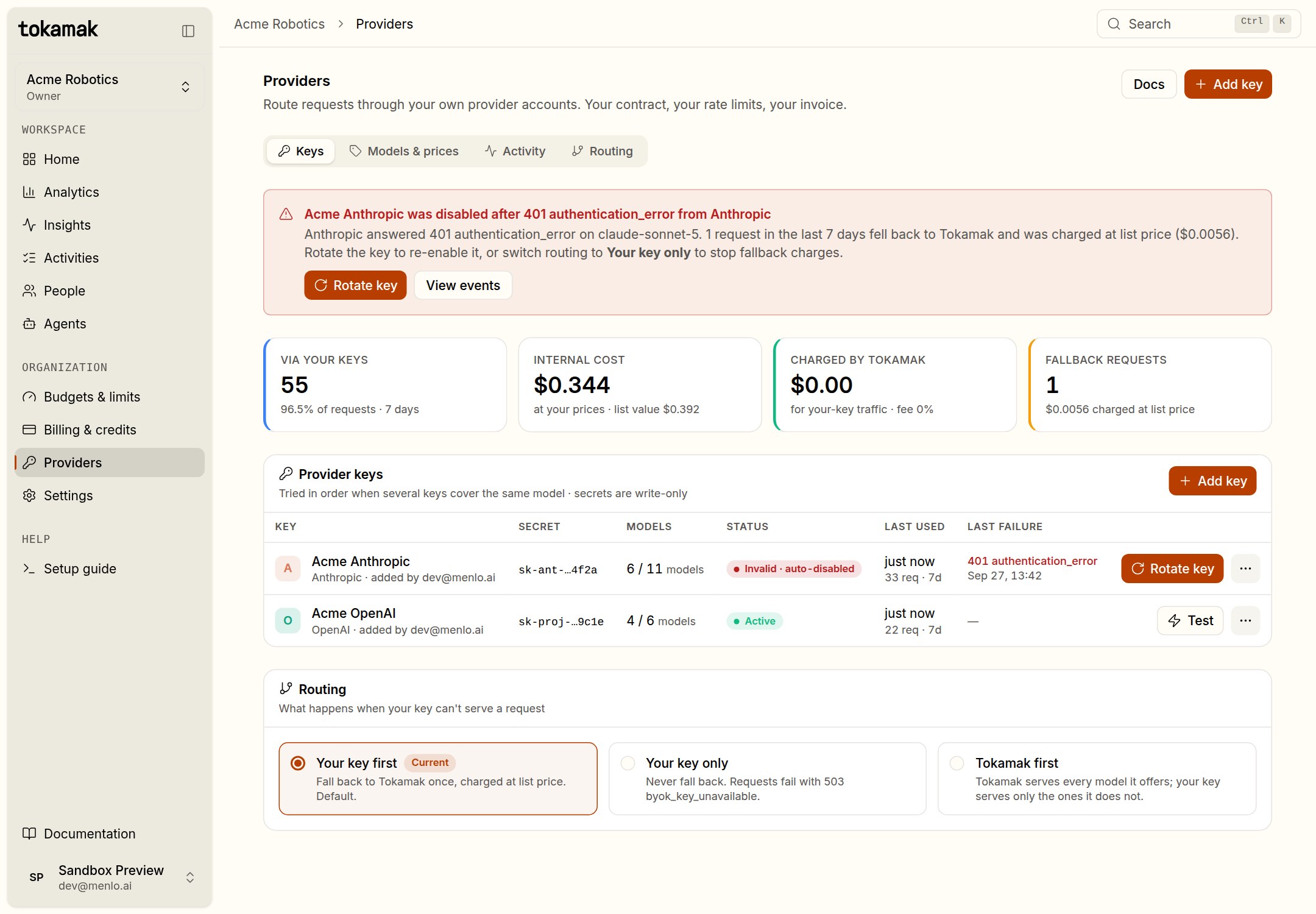
Select the key to see its details, the access of each model and its event history.
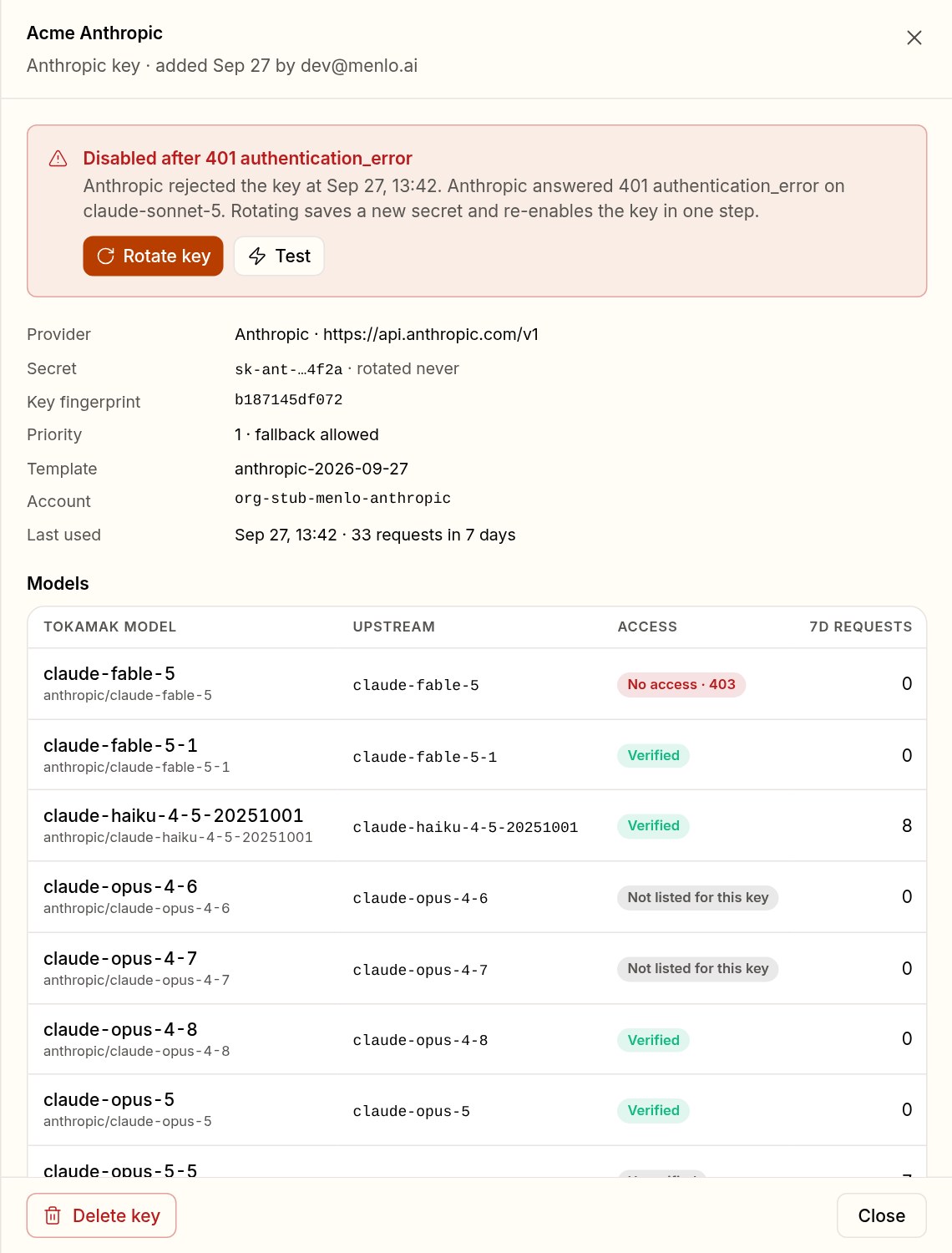
Rotate the key
Choose Rotate key and paste the new secret from your provider. Tokamak tests it, saves it and, if the key was disabled automatically, switches it back on in one step. The next request uses it. A secret the provider rejects is not saved.
- A key that was disabled automatically cannot simply be switched back on: its secret was rejected, so it must be rotated. A key you disabled yourself stays disabled after a rotation until you enable it.
- Rotating keeps the key's name, models and priority, and your internal prices. The key's event history records the rotation.
- Rotate on a schedule, too: paste the new secret before you revoke the old one at the provider, and nothing fails in between.
Choose how strict to be

- Your key first keeps your tools working through a key failure, at list price for the requests that fell back.
- Your key only guarantees that no request for a model your keys serve runs on Tokamak's capacity or is charged by Tokamak, at the cost of failed requests while a key is down. Choose it when a data agreement or a contract requires those requests to run on your own account. A model whose mapping is off (you left it unchecked, or your provider refused it) is not served by your keys, so Tokamak serves it. There is no per-organization block for a model yet: access policies only filter
tokamak/autocandidates and have no console page or API.
To see fallback over time, open Analytics › Credential source: the Fallback rate tile and the fallback band of the chart count it. See Prices and reports.
Prices and reports
Set the internal price your organization's own keys are metered at, per model or as a discount, and read what your keys served, what fell back and what reached your credit.
Insights
See who is coding through Tokamak right now, and when your organization, a team or one person works, from the telemetry coding tools already send.