
Connected applications
Let an application such as work-agents sign people in with their Tokamak account, read your organization's members and changes, and act for the people who allow it.
A connected application uses Tokamak as its sign-in and organization authority. People sign in to it with their Tokamak account. Tokamak tells it which of their organizations they may enter. When someone leaves your organization, is suspended, or the application is turned off, the application learns about it from Tokamak.
Your Tokamak operator registers the applications a deployment offers. Organization admins decide whether each one is enabled for their organization. Each member decides whether it may read Tokamak analytics as them.
Enable an application
Under Organization settings › Applications, switch the application on. Only org.admin can do this.
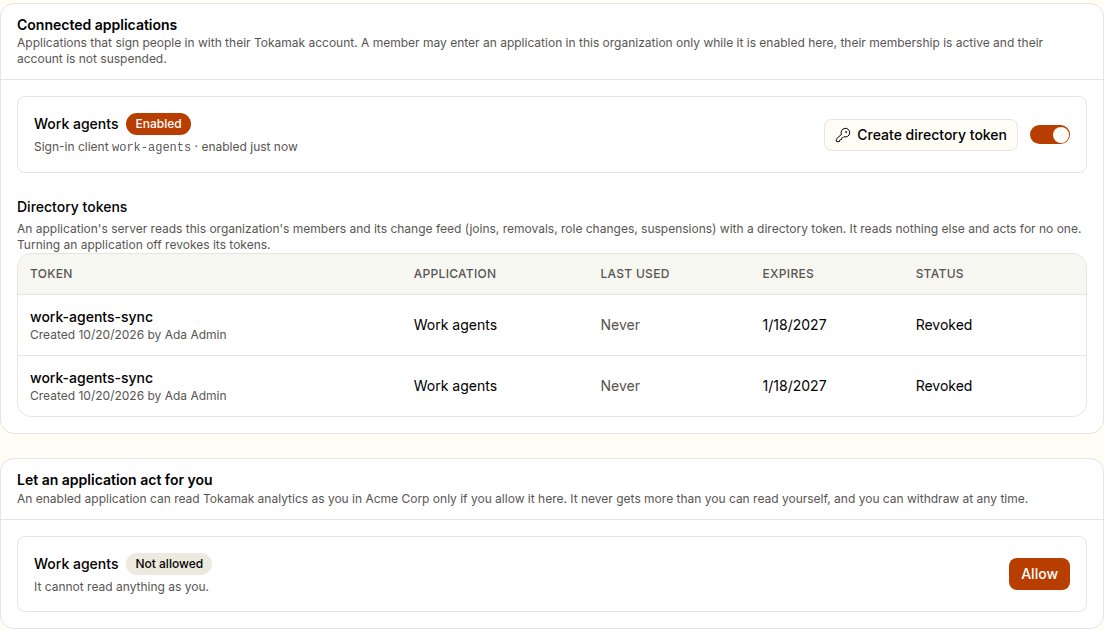
From then on, a member who signs in to the application may enter it in this organization. All of these must hold:
- their membership is active;
- their account is not suspended;
- the organization is not archived.
Each answer is valid for a few minutes at most, and the application asks again before it lets someone in. So removing a member, suspending them, or turning the application off takes effect at once.
Turning the application off also revokes its directory tokens and every member's permission to act for them. Turning it back on restores none of these.
Give the application a directory token
The application's server keeps its own list of your members with a directory token. Select Create directory token, name it and copy it once. A directory token reads only:
- this organization's members: account, email, role and whether the account is active or suspended;
- the changes to them, in order: joins, removals, role changes, suspensions and restorations, and the application or a permission being turned on or off.
It cannot read usage or analytics, act for anyone, or see any other organization.
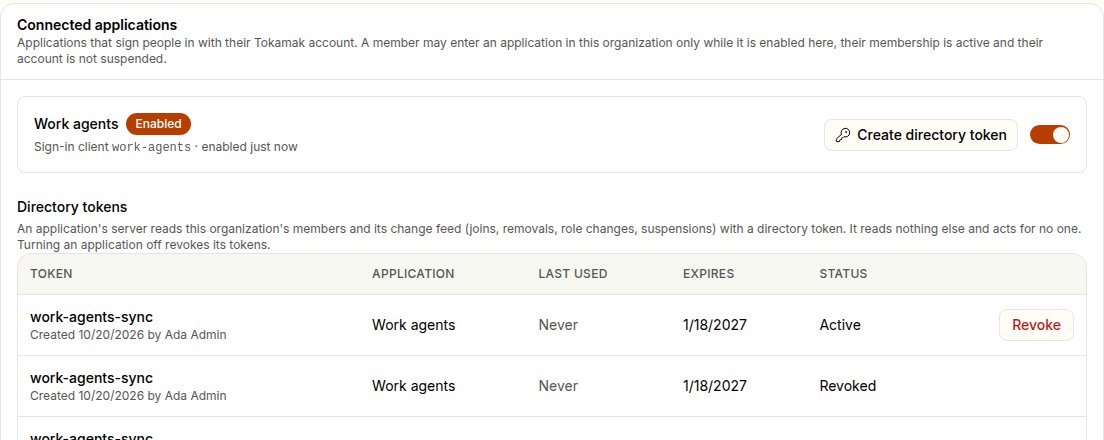
To rotate, create a new token, switch the application over, then revoke the old one. An organization holds at most five active directory tokens per application.
Let the application act for you
Every member decides for themself, under Account › Connected applications (open the account menu at the foot of the sidebar). Members don't need any organization permission for this page. Admins also see the same panel under Organization settings › Applications. Select Allow, then choose what it may read as you (usage and cost, insights) and for how long.
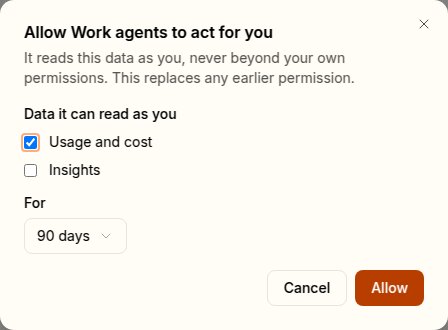

The application then reads Tokamak analytics as you, never beyond what you can read yourself or what you allowed. Every answer names you, the application and your permission. Withdraw stops it immediately. Leaving the organization, or the application being turned off, also ends it.
Connect the application's server
An admin creates an MCP token under Organization settings › MCP and chooses the application under Issued to. Only a token issued to an application can act for members who allowed it.
If this deployment has no registered applications, an admin can still explicitly choose No application (organization only). This is never selected automatically, and other failures to load connected applications block token creation until a successful retry.
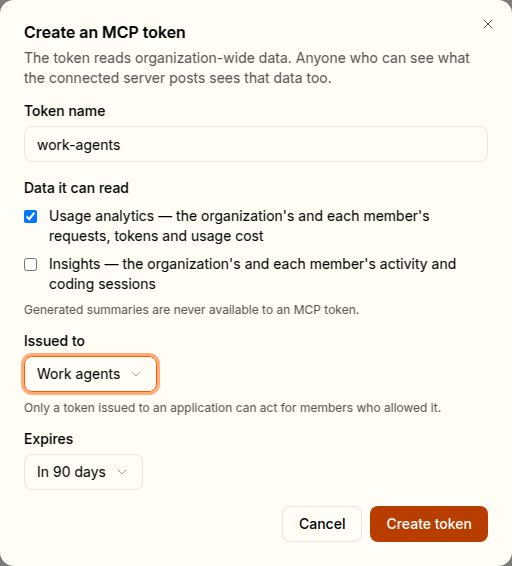
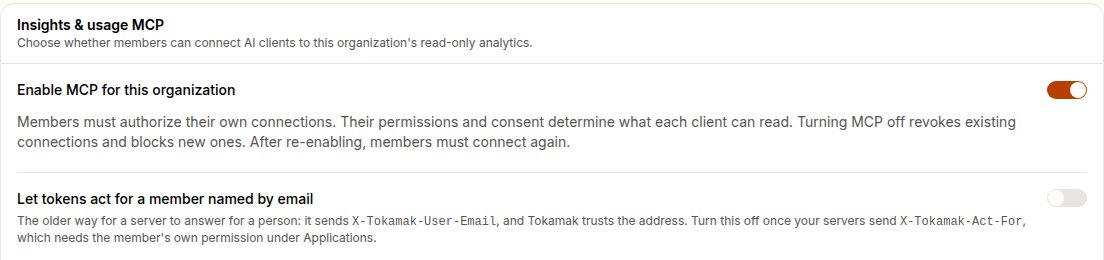
The application's server sends the member's Tokamak account id in X-Tokamak-Act-For with that token. Organizations that already used MCP tokens before this release may still name a member by email (X-Tokamak-User-Email). Turn Let tokens act for a member named by email off once your servers send X-Tokamak-Act-For. In a new organization it starts off.
For application developers
The contract (eligibility, directory and change feed, delegations, error codes) is in the backend reference, connected applications. In short:
- Sign people in with your own confidential client in the realm, using authorization code with PKCE. Its access tokens must name your client as both audience and authorized party.
- Call
POST /auth/apps/eligibilitywith the person's access token. Admit them only onallow, and never pastvalid_until. Treatunknown, an error or an expired answer as a deny. - Keep your member list from
GET /auth/directory/v1/membersplusGET /auth/directory/v1/events, replaying the feed from the snapshot's watermark. On410 cursor_expired, take a new snapshot. - A missing page or an error is never "everyone left".
Settings for operators
| Variable | Default | Description |
|---|---|---|
TOKAMAK_AUTH_APPLICATIONS | — | Registered applications, id=realm_client[=Display name], comma-separated |
TOKAMAK_AUTH_APP_ELIGIBILITY_TTL | 5m | Longest an eligibility answer stays valid |
TOKAMAK_AUTH_IDENTITY_EVENT_RETENTION | 720h | How long the change feed keeps events |
TOKAMAK_AUTH_REBIND_FROM_ISSUERS | the legacy issuers | Issuers an account may be moved away from by verified email |
Not covered
- Enablement is per organization; there is no per-person assignment yet.
- Teams appear as role changes. Other group sync, SCIM and changing Slack or GitHub access are not provided.
- An account disabled in your identity provider reaches Tokamak through directory lifecycle sync when your operator runs it, within its interval.
Directory lifecycle sync
Suspend Tokamak access, API keys included, when an account is disabled or deleted in Keycloak, and restore it when the account comes back.
Claude Pool
Serve an organization's Claude traffic on registered Claude subscription setup-tokens, metered and billed exactly like API-key usage.